
Lo que conviene saber sobre el mundo de Squarespace.
Para diseñadores, desarrolladores y personas que crean negocios en torno a Squarespace.
![How to get a discount on Squarespace [March 2025]](https://images.squarespace-cdn.com/content/v1/558ae872e4b06e5cac195ad7/1617333129395-4ZHX55XALLR4P6LW41QA/Squarespace%2BDiscount.jpeg)
How to get a discount on Squarespace [March 2025]

Use our code SQSPTHEMES10
to save 10%
Squarespace doesn’t have a free plan, though they do have a free trial. This can make it difficult for them to compete against website builders that do have free plans, at least among the audience of people who don’t realize why having ads added to their site is bad.
To ease the burden of that initial price, coupon codes are a great resource. There are always several of them floating around, and there are many different ways to get this discount. I’m going to try to keep this post up to date with any methods of getting coupon codes I can find, so if you know of one (that isn’t just your affiliate code), let me know!
Get up to 30% off ALL plans when you pay annually
No hace falta ningún código de descuento
What to Know About Squarespace Discounts

Before I get into the specific discount codes you can use, I want to make a few general notes about discount codes across the board.

First and foremost, every discount code you find will apply to your first purchase only.
In other words, the discounts are limited to one per transaction, for the first purchase of a new website.
To get the most out of a discount, I have a few tips for you before you sign up:
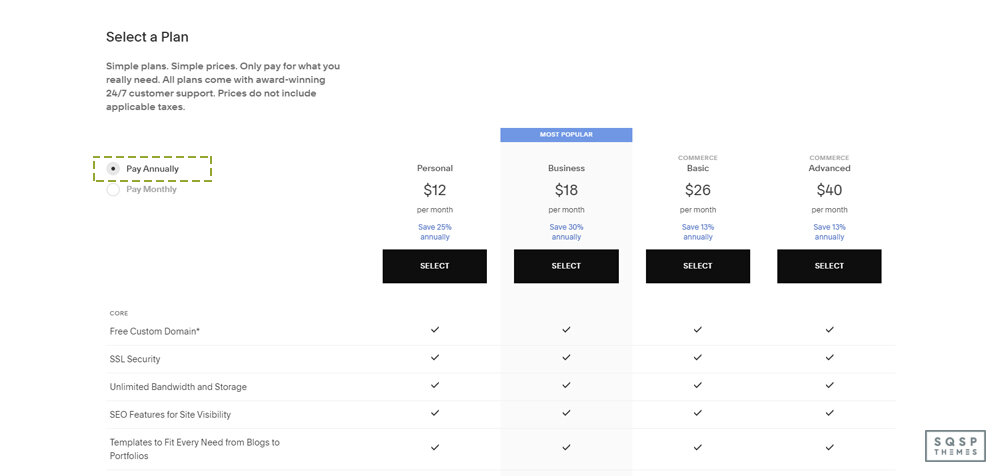
Get up to 30% off ALL plans when you pay annually
No hace falta ningún código de descuento
Pay annually. I know it’s a big up-front purchase to buy an annual subscription, but keep in mind that you’re getting double the discounts when you do. Let’s say you’re buying a Business plan, their most popular plan.
Monthly, with no discount: $26 per month, for $312 per year.
Monthly, with a 10% discount: You get 10% off your first payment of $26, so your annual cost is $309.40
Annual, with no discount: $18 per month, for $216 per year.
Annual, with 10% discount: You get 10% off your first payment of $216, so your annual cost for the first year is $194.40.
Thus, using the smallest possible discount while buying an annual plan has you paying $117.60 less than you would if you didn’t bother to optimize your purchase. That’s quite a discount! It’s even better if you take advantage of a larger discount than their basic 10% off deals that they run.

Buy the largest plan you think you might need. Squarespace offers four packages: Personal, Business, Commerce, and Advanced Commerce. You can view their pricing page to see the difference in features between them, as well as the default pricing.
My recommendation is to buy the highest tier plan you need at the outset. If you think you might want Commerce, but might only need Business, you can always downgrade later. However, if you buy Business and decide that you want the features from Commerce, you can upgrade later, for a fee.
The trouble is, you can’t apply a coupon code to a subscription upgrade. You save the most money by buying the larger plan with a discount than buying the smaller plan and upgrading at full price later.

Make use of the educational discount if you can. The last option on my list here is the best one by far. Most Squarespace offers are 10% or 20% off your first payment, but the educational discount is 50% off your first year. It’s harder to qualify for since you need an email address from your educational institution to enroll, but it’s well worth it if you can get it.

Don’t be afraid to wait. Squarespace very frequently offers coupon codes for holidays and special promotions. If a current code has expired, or it’s not the best discount and you want to see if a new code for the next month is better, go ahead and wait for it. I wouldn’t wait an entire month, but if it’s just a few days until the current code expires, it might be worthwhile waiting for the next one.
So, there you go; my tips for getting the biggest discount you can out of Squarespace. Now let’s look at ways you can get those discount codes.
Option 1: Basic Squarespace Discounts
Squarespace has one permanent discount code that is always active and always available on their site. When you sign up and go through the checkout process, you’ll be prompted to enter any discount codes you may have.

One of those discount codes is “GIMME10”. This is promoted directly on the Squarespace coupons page and gives you 10% off of your purchase. It’s only valid for your first purchase, and it’s the single smallest discount you can get. Just about any other offer is going to be a bigger discount, this is just their permanently available offer for anyone looking to sign up.
Option 2: Monthly Discounts
Squarespace often has promotions of its own that they run every month. For example, as I’m writing this at the end of March, they have a banner with the code “MARCH20A” at the top of their site. That code is 20% off your first purchase, much like the code above. The trick is, it expires at the end of March. Squarespace will likely have an April or an Easter or Spring-themed code for next month, for example.

There’s almost always some kind of promotion running. It’s an open secret that Squarespace always has some kind of discount running, so you never have to pay full price for signing up.
How do you find this code? Just check their website. It’s usually in a banner at the top of their page.
Option 3: Work with a Circle Member
Squarespace has a program called Circle. People who are big into Squarespace can sign up to be Circle members. Circle members get a bunch of benefits, including discounts on subscriptions, six-month versions of trial sites, prioritized support from Squarespace directly, exclusive content, guides, and release notes, and a special badge they can add to their sites.

To be eligible for Circle, a developer first needs to be active in running or contributing to at least three active Squarespace sites. You need to apply to be a Circle member, and not everyone makes it.
One of the main benefits a Circle member can offer is that, when you work with them to set up a site, you get an automatic 20% off. There’s no code to apply, but your site needs to be set up by the Circle member. Usually, this means working with a freelancer or agency that sets up Squarespace sites for a living.
The hard part of this discount is finding a Circle member. There’s no directory of Circle members, you simply need to look for the Circle badge on the site of the person you’re scouting, or send them an email or contact message asking if they’re a Circle member and can work with you.
Option 4: Hire an Expert
Working with a Certified Squarespace Expert gets you an automatic 20% discount when you have your site designed by their agency. Squarespace maintains a directory of certified experts. You can browse that directory here.

You can also go through the “get matched” process by clicking the button at the top of that page. You log in with your Squarespace account and fill out a series of forms to create a brief for your website. The brief goes out to relevant experts, and those experts can reach out to you and pitch their services.
Unlike Circle, you don’t need to have the expert make your site for you. Many experts offer training courses, resources, exclusive communities, or eBooks to help you design your first site. They simply have a custom coupon code that can give you a 20% discount when you reach whatever point in their training where they give it to you.
It’s difficult to generalize this option, simply because every expert has a unique process and program that they recommend. You’ll have to experiment with them yourself.
Option 5: Educational Discounts
Squarespace wants to be part of education programs for aspiring web developers, designers, and content creators, as well as those looking to get started in eCommerce while they’re still in school. As such, they offer an educational discount, which is one of the best discounts out there.

Unlike other discounts, the educational discount is 50% off your first year, regardless of whether you’re paying monthly or annually. That’s a lot!
To first claim this discount, you need to have an email address assigned to you by your educational institution. For example, yourname@university.edu is the general email format, though every university already has a domain name. Squarespace will ask you to select your educational institution from their list. If your school doesn’t happen to be on the list, you can fill out a form and they’ll set about adding it, and then reach out to the school to enroll in the program. Once your institution has, Squarespace will send you an email letting you know and giving you their discount offer.
This discount isn’t just for students! Students are the main target audience, but faculty and staff can also take advantage of it. Professors, TAs, teachers, administrative staff, custodial staff; anyone who has a .edu email address can qualify. If you can qualify for this, it’s a great deal, and I highly recommend giving it a try.
Option 6: Additional Discounts
There are quite often a few other discounts and offers available. Forbes does a good job of aggregating these and keeps a handful of discounts available. Some of their “offers” aren’t real offers, though. The “13-30% off annual plans” is just Squarespace’s default annual pricing, but it’s listed as a special offer here.
Conclusión
I highly recommend Squarespace as a great place to start a website or online business, but I readily acknowledge that the price can be a little steep when you’re not sure whether or not your idea will pan out and make money. It can take quite a while to build a site up to the point where you’re making back your investment, and some people take years to reach that point.

If you want assistance with setting up a Squarespace site, or if you want custom themes or templates, please drop me a line. I love helping people get started. Feel free to reach out via the site, or just click here to get started with Squarespace. Don’t forget to check for active discounts!

You’ve Done It Before. You Can Do It Again.
These are transcribed notes from my talk at The Website Designer Summit 2025
You built something. You became known for it.
It got you clients, credibility, maybe even a thriving business.
And yet, you feel the pull—toward something more, something different.
But every time you consider making the shift, fear kicks in.
What if I lose everything I’ve built?
What if I have to start over?
What if I pivot and regret it?
What if I disrupt what’s already working?
What if I try, and it doesn’t take off?
These aren’t just passing doubts. They’re the kind of questions that keep people stuck, circling the same ideas without ever moving forward.
But here’s the truth:
You’ve done it before. You can do it again.
The Cycle of Growth
If you’ve built something once, you’re not starting over—you’re stacking on top of what you already know.
The problem is, we’re conditioned to see growth as a straight path—one success leading directly to the next. But that’s not how it works.
Growth is a cycle:
Capture – You get curious about a new idea.
Develop – You experiment, refine, and master it.
Expose – You share it with the world and build credibility.
Evolution – You feel the pull to grow beyond what you built.
And then? The cycle starts again.
You’ve already been through this. The first time you learned web design. The first time you took on a paying client. The first time you built something that actually worked.
That same person—the one who figured it out—is still here.
So instead of fighting the shift, let’s talk about how to move through it with confidence and make this transition sustainable.
How to Process the Transition
Before you can move forward, you have to call out the fears holding you back.
1. What Will I Lose?
The fear of loss is real. You’ve worked hard to build credibility, a client base, and a reputation. But evolution isn’t erasure. What you’ve built isn’t disappearing—it’s becoming the foundation for what’s next.
2. What If I Have to Start Over?
You don’t. You’re not a beginner anymore. You have skills, relationships, and knowledge that you didn’t have the last time you made a leap. The difference between starting from scratch and starting from experience is massive.
3. What If I Pivot and Regret It?
Every pivot is an experiment. It’s not a lifetime commitment. The mistake isn’t changing direction—it’s staying in something that no longer fits just because it feels safer than the unknown.
4. What If I Disrupt What’s Already Working?
If something feels heavy, draining, or uninspiring, then it’s already breaking down. You don’t have to burn everything down to grow—you just have to shift your energy toward what actually excites you.
5. What If I Try and It Doesn’t Take Off?
Then you adjust. Just like you did when you were figuring things out the first time. The difference is, you now have experience, an audience, and a network—so the stakes aren’t as high as they feel.
The Mindset Shifts That Make It Work
Once you’ve named the fear, you have to reframe it. Here’s what that looks like in action:
You Are Not the Thing You Built
Your identity isn’t tied to what you do—it’s tied to who you are. The thing you built was an expression of your skills at the time, but it’s not the end of the story.
You’re Not Starting Over, You’re Stacking
The work you’ve done so far isn’t wasted. It’s leverage. You’re not abandoning your expertise—you’re expanding on it.
You Don’t Have to Be an Expert to Start
Most people don’t hesitate because they lack skill. They hesitate because they don’t want to be seen as a beginner again. But mastery is just a series of cycles, and you’ve already proven you can go from novice to expert before.
Success Isn’t a Trap—Unless You Let It Be
If you feel trapped by what you’ve built, it’s not because the work is too good to leave. It’s because you’re afraid of what happens when you step into something new. But staying in a box that no longer fits isn’t success—it’s stagnation.
Energy Doesn’t Lie—Follow What Feeds You
When something starts to feel heavy, that’s a sign. Ignoring it doesn’t make it go away—it just means you’ll eventually burn out or start resenting your own success.
So, now that we’ve shifted how you think about it, how do you actually move forward?
How to Make the Transition Sustainable
If you’re going to shift, do it in a way that doesn’t cause chaos. Here’s how:
1. Clarify What Actually Inspires You Now
Stop asking what’s profitable and start asking:
What do I talk about, create, or obsess over without trying?
What problems do I feel pulled toward solving?
What do I wish existed in my industry?
2. Find the Overlap: Old Credibility + New Direction
Your evolution doesn’t have to be jarring. It can feel natural—to you and your audience.
Instead of, “I’m quitting web design to do something totally new,” think:
“I’ve spent years helping businesses create better websites. But what I’ve realized is, most of them don’t just need a website—they need a way to grow their brand online. So now, I’m helping people do exactly that.”
This makes it clear: you’re not leaving everything behind. You’re just zooming out.
3. Test Before You Go All In
Big pivots feel risky. Small experiments don’t.
Instead of making a huge announcement, just start doing it.
Post about your new direction.
Offer a small, low-stakes service or product.
See where the energy is.
4. Turn Your Inspiration Into Assets
Your interests don’t just have to be side projects. They can be revenue streams.
If people keep asking you for advice on something, turn it into a product.
If you’re repeating the same insights in DMs, package it into a guide.
If you’re sharing knowledge, create something people can buy.
The key is shifting from only selling time to creating repeatable assets that work for you.
5. Leverage Systems & Partnerships
You don’t have to build everything from scratch.
Who already has access to the audience you want?
How can you set up systems so this work generates income without needing your constant effort?
Success doesn’t just come from working harder. It comes from designing smarter.
You’ve Done It Before. You Can Do It Again.
This isn’t your first time figuring something out. It won’t be your last.
But this time, you get to do it with more clarity. More leverage. More confidence.
So, what’s the next move?
Because the only way to know if it’s the right one—
is to take it.

How to Write a Web Design Case Study That Actually Wins Clients
Most web designers make the same mistake when writing case studies.
They focus on what they did instead of why it mattered.
A case study isn’t just a recap of your project. It’s proof that your work solves real business problems. Potential clients aren’t interested in the fact that you built a new homepage or improved site speed—they want to know how those changes made an impact.
They want to see a transformation.
So let’s talk about how to write a case study that doesn’t just fill your portfolio but actually gets you hired.
Start With the Problem
Every great case study starts with a clear, compelling problem.
Imagine a small boutique coffee roastery, Golden Bean Coffee. They’ve spent years perfecting their craft, sourcing beans from the best growers in the world, and building a loyal local following. But their website? It’s a mess.
Customers struggle to navigate it. The checkout process is frustrating. Their online sales are almost nonexistent.
And that’s the real problem—not that the website looks bad, but that it’s losing them money.
If your case study starts with a sentence like:
“Golden Bean Coffee needed a new website.”
You’ve already lost your reader. There’s no tension, no reason to care.
Instead, try something like:
“Golden Bean Coffee built a thriving local business, but their online store told a different story. Customers struggled to navigate the site, and abandoned carts were piling up. Their website was costing them sales—so they called us.”
Now, we’re invested. We understand why the project mattered.
Show Why the Old Site Wasn’t Working
Before you get into the redesign, paint a clear picture of what wasn’t working. Don’t just say the website was outdated—explain how it was failing the business.
Maybe it was slow. Maybe the navigation was confusing. Maybe it wasn’t mobile-friendly.
For Golden Bean Coffee, let’s say:
“Visitors would browse the shop but leave before purchasing. The site took too long to load, and product pages buried key details. Mobile users had an even harder time—half of them abandoned their carts before checkout. Every day, potential sales were slipping through the cracks.”
Now we can see the problem. We feel the frustration. And that means we’ll care about the solution.
Explain Your Approach (Without Jargon)
Once you’ve set up the problem, it’s time to introduce your solution.
This is where a lot of web designers go wrong. They start listing technical details:
“We updated the navigation, improved site speed, and optimized the checkout process.”
Technically true, but deeply uninteresting. It doesn’t tell us why those changes mattered.
Instead, explain your thought process. Why did you make those changes? How did they improve the experience for real users?
For Golden Bean Coffee:
“We streamlined the navigation so customers could find their favorite roasts faster. We restructured the product pages to highlight tasting notes, origin details, and brewing tips—turning casual browsers into confident buyers. And we rebuilt the checkout flow, making it mobile-friendly and frictionless.”
This is still simple and easy to understand, but now we can see the impact of your design choices.
Make the Transformation Undeniable
Your case study should have a clear before-and-after contrast. Don’t just say the new site looks better—prove that it works better.
This is where results matter. Maybe sales increased. Maybe bounce rates dropped. Maybe customer engagement went up.
For Golden Bean Coffee, the transformation might look like this:
“With a faster, clearer, more intuitive shopping experience, sales didn’t just improve—they skyrocketed. Online revenue doubled in the first three months. Mobile purchases jumped by 60%. Customers weren’t just browsing anymore—they were buying.”
See how concrete that is? Even if you don’t have precise metrics, you can still highlight changes in behavior. Maybe support requests about the website dropped. Maybe the business owner told you they finally feel proud sending people to their site. The goal is to make the transformation feel real.
Let the Client Have the Last Word
A strong case study ends with the client’s perspective. A testimonial is more than just social proof—it reinforces the impact of your work in their own words.
If your client says:
“We love our new website.”
That’s nice, but it doesn’t say much.
If they say:
“Our online sales have never been better. The checkout process is smooth, customers love the new design, and we’re finally seeing the growth we hoped for.”
Now that’s powerful. It shows that the project didn’t just change the website—it changed their business.
Tie It All Together
By now, your case study should feel like a transformation story, not just a list of deliverables.
Start with a compelling problem
Show why the old site wasn’t working
Explain your approach in a way that’s easy to understand
Make the before-and-after contrast undeniable
End with a strong client takeaway
And finally, close with an invitation.
Not a hard sell. Not “Hire me now.” Something subtle but effective, like:
“A website should be as seamless as the business it represents. If yours isn’t, let’s talk.”
Because at the end of the day, a great case study doesn’t just show off your skills.
It makes your next client think, That’s exactly what I need.
Tus próximos pasos
Use this framework for your next case study.
Focus on the transformation, not just the tasks.
Share it where potential clients will see it—your website, LinkedIn, email list.
And if you already have a case study, drop a link in the comments. I’d love to take a look and give you feedback.