
Lo que conviene saber sobre el mundo de Squarespace.
Para diseñadores, desarrolladores y personas que crean negocios en torno a Squarespace.

The Missing Link Between Squarespace and Digital Product Sales
Most people who build their business on Squarespace hit the same wall eventually. They’ve got a beautiful website. A product or idea that people actually want. But when it comes to selling digital downloads—PDFs, templates, videos, memberships—it starts to feel… clunky.
Squarespace makes it easy to sell things you can ship.
But if you’re trying to sell things you can send, that’s where it gets tricky.
You can upload a digital file through Squarespace Commerce, sure.
But what about:
Sending updates or new versions to existing buyers?
Limiting downloads or preventing link sharing?
Adding affiliates or upsells?
Delivering courses, memberships, or license keys?
That’s where SendOwl comes in.
What’s Missing in Squarespace’s Digital Product System
Squarespace is brilliant for design-driven business owners. It gives you a polished storefront, fast hosting, and zero maintenance headaches.
But when it comes to digital delivery, it’s still got room for growth.
Here’s what that looks like in practice:
| Limitation | What it means for you |
|---|---|
| 300 MB file limit (Squarespace Help Center) | You can’t upload large videos, photo packs, or software files. |
| Only one file per product | You can’t bundle a set of templates or layered design assets unless you zip them together. |
| No download or license control | Buyers can share your files freely. You can’t limit downloads or track usage. |
| Link expirations you can’t control | When links expire, you can’t easily resend or extend access. |
| No affiliate or referral tracking | You can’t reward partners for helping sell your product. |
Why SendOwl Fills the Gap
SendOwl was built for exactly this moment: when you’ve outgrown Squarespace’s built-in delivery system but still want to keep your website, your brand, and your freedom.
It’s not another storefront. It’s an invisible layer that handles what Squarespace can’t — securely, automatically, and without friction.
Here’s what it adds back in:
Bigger files & multiple downloads. Host anywhere and deliver bundles of assets with ease.
Control & security. Set limits on downloads, expire links, or disable access at any time.
PDF stamping. Watermark buyer emails on every copy to prevent piracy.
Affiliate tools. Let collaborators and fans earn commissions when they share your products.
Subscriptions & memberships. Automate recurring payments, drip releases, and upgrades.
White-label checkout. Embed the purchase flow directly into your Squarespace site — no ugly redirects.
That’s what makes SendOwl the missing link: it turns your Squarespace website from a portfolio into a digital product business.
Why It Matters
If you’re selling more than a handful of digital products, the cracks in Squarespace’s system eventually show.
You spend more time patching than producing.
You worry about piracy, file limits, or version updates.
And every time someone asks, “Can I get a new link?” — you’re doing manual customer support you never planned for.
SendOwl gives you leverage.
It automates the part of your business that should be automated — delivery, updates, referrals — while letting you focus on what actually drives growth: creating and promoting your work.
🎯 Who This Is For
This integration is ideal for:
Squarespace designers & developers selling plugins, templates, or code snippets.
Educators & coaches offering guides, workbooks, or online courses.
Photographers & artists selling presets, digital prints, or media packs.
Consultants & studios delivering proprietary frameworks, contracts, or systems.
If your work lives online and your brand lives on Squarespace — SendOwl keeps both connected.
What’s Coming Next
This post kicks off a 4-part series designed to help you master SendOwl from setup to sales.
Here’s what’s next:
How to Integrate SendOwl with Squarespace (Step-by-Step Tutorial)
How to Secure PDFs, Files, and Videos When Selling Online
SendOwl vs Gumroad vs Lemon Squeezy — Which One’s Best for Squarespace Creators?
If you’ve been looking for a clean, reliable way to sell digital products through your Squarespace site—without the headaches—this series is for you.
👉 Next up: I’ll walk you through how to integrate SendOwl with Squarespace, step by step.
A Way Out of the Comparison Trap
I'm doing a workshop tomorrow on how to spot the market opportunities other designers miss, and I wanted to invite you.
Here's why.
Whenever the topic of scaling comes up - scaling your Squarespace business, for example - most people look around at what others are doing to decide what they should or shouldn't do.
So and so's selling templates... maybe I should too. So and so's selling VIP days... maybe I shouldn't. So and so's selling coaching... maybe I should.
And on and on.
It feels like market research, right? You're looking at pricing, studying the "competition." But really you're just priming yourself for the comparison trap.
Because once you're fixated on what everyone else is doing, your own path gets cloudy. Soon it looks like everyone's doing the same thing.
And over time this drains us and depletes our energy. Energy flows where attention goes.
The good news: there is a way out.
The comparison trap doesn't have to hold you indefinitely. The way out starts with your own self-concept.
Who are YOU?
Better yet, who are you to your most valued clients? What role do you play in their story? And are you naming that role in your own?
Whatever comes after "I AM..." in your mind sets the stage for how the world will receive you.
If you've told yourself "I'm just a Squarespace web designer," you've automatically limited yourself to people who just need a Squarespace website.
And I'm sure you've discovered that doesn't mean the same thing for everyone.
Tomorrow I'm going to walk you through how to flip that pattern recognition engine - it's always active in the back of our mind - and redirect it toward the opportunities hidden inside your client work.
Because I promise you: you are sitting on a gold mine.
You're not new to this, you're true to this. You've been at it for a while and you've created oodles of value.
When you start to see it through the lens where that value is most desired and needed, that's when you experience the shift.
That's when the outside world begins to look different.
No more comparison trap. Just a hungry market that recognizes, desires, and demands the value you already bring.
If you're ready to experience that shift - if you're ready to unearth the value you've been quietly sitting on - I'd love for you to join me tomorrow.
How to Spot the Market Opportunities Other Designers Miss (and Turn Them Into a Gold Mine)

Turn Your Squarespace Photography Website Into a Client Magnet
So many talented photographers struggle with the same thing: a beautiful portfolio of work, but a website that doesn’t do them justice. Maybe it’s confusing to navigate. Maybe the messaging doesn’t clearly reflect their brand or speak to the right clients. Or maybe there are simply too many images without real curation, leaving visitors overwhelmed instead of inspired.
Here’s the truth: your website isn’t just a gallery. It’s your hardest-working team member - the first handshake with a potential client. In just a few seconds, people are deciding if they like your style, if you feel like an expert they can trust, and whether you’re the right fit. If your site doesn’t answer those questions quickly, they’ll move on.
The good news is that a handful of intentional updates can make your Squarespace photography website feel clearer, more professional, and ready to book your dream clients.
Let’s break it down, starting with the part of your site most people see first - your homepage.
1. Homepage Clarity
Your homepage is prime real estate. Think of it like your storefront: people glance in, scan, and decide if they want to stay.
It’s also where you set the tone for both visitors and Google. Start with a keyword-rich headline that combines your service with your location - for example, ‘Editorial Wedding Photography New York’ or ‘Family Photographer in Maine.’
Alongside this, your opening messaging should make it clear what sets you apart, whether that’s your style, approach, or personality. Once that foundation is in place, layer in trust-builders like testimonials, venue knowledge, or publication features, and then reinforce that authority and consistency across the rest of your site.
In short: say what you do, where you do it, and why it matters - clearly, confidently, and in language your dream clients will instantly connect with.
On your homepage, make sure to include:
● An intro that explains how you work and what you offer
● Your best images curated as a cohesive collection (don’t just use brides and grooms - mix in details and portraits for interest)
● Links to blog posts or real weddings or shoots - three is ideal, and choose venues or locations you’d love to book again
● FAQs and a “venues I love” section. Squarespace’s accordion block is perfect for natural language but keyword-rich FAQs to boost SEO
● An “as featured in” section with publication logos or awards
● Testimonials. Real words from real couples carry weight
● A strong call-to-action: “Check if I’m free for your date.”
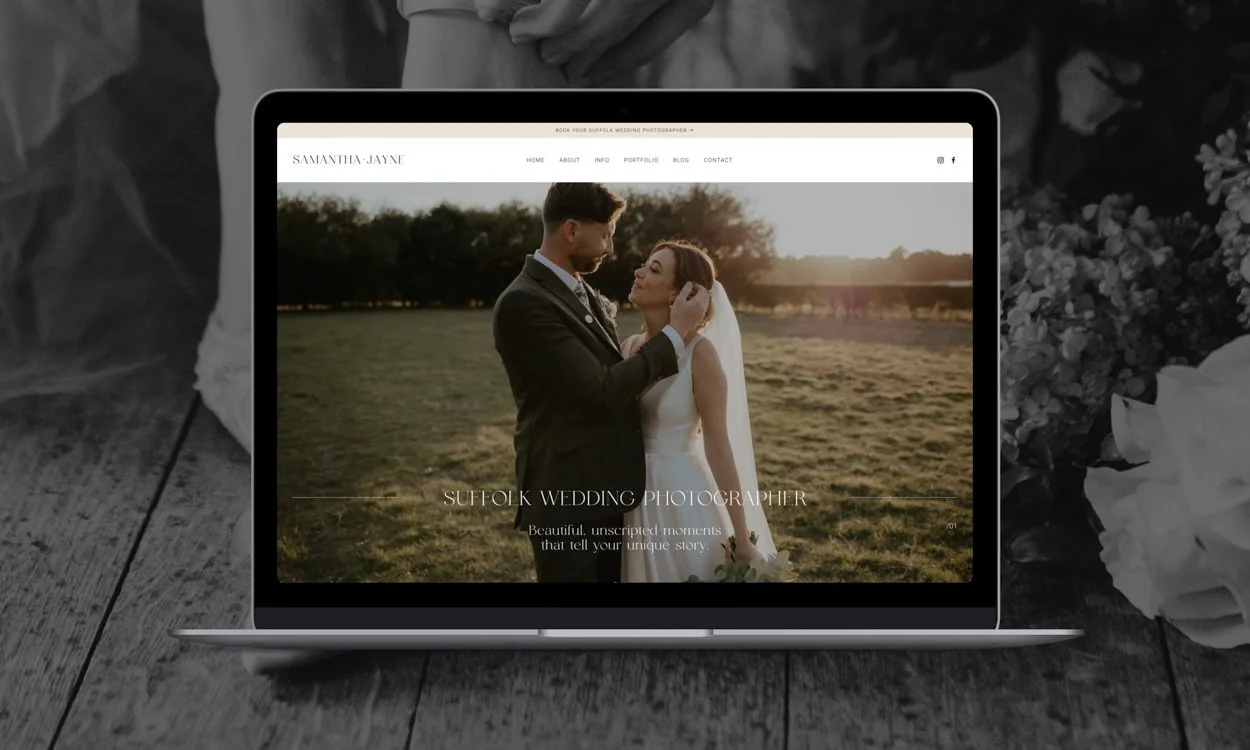
For example, on Samantha Jane Photography’s website, her homepage combines a strong hero image with her primary keyword above the fold, plus links to blogs, testimonials, FAQs, and venue knowledge - giving both visitors and Google confidence she’s an expert.
2. Storytelling & Branding
Your photos show your craft, but your brand tells your story and it needs to resonate with the clients you most want to attract.
If your ideal couples are adventurous and fun, your site should feel bold and playful, with vibrant colours, modern fonts, and relaxed, chatty copy. If they’re editorial and refined, your site should feel calm and elegant, with muted palettes, serif fonts, and confident, minimal copy.
Every element plays a role: colours create the atmosphere, fonts set the tone, your copy speaks directly to your client in a way that makes them feel understood, and your imagery shows the kind of stories you want to be known for.
On Katie Rogers’ site, for example, we focused on elegant branding and carefully curated imagery - from muted tones to classy serif fonts to refined copy - all reflecting her editorial film style. Visitors instantly know whether her approach resonates with them.
3. Curating Imagery
Too many images can create overwhelm. A curated gallery shows confidence and builds trust.
I usually suggest one highlights gallery with 30-40 of your strongest images. Make sure they share a consistent edit and flow well together on the page and include a good mix
of wide shots, close-ups, and details so the gallery feels confident and varied without overwhelming visitors.
Alongside your highlights, use blog posts to showcase real weddings or shoots. A gallery shows your range, but a blog demonstrates consistency across a full wedding or shoot. It reassures potential clients that you can deliver from start to finish.
4. SEO That Works While You Sleep
SEO is what ensures people actually find your site. It doesn’t have to be complicated. Focus on:
● Homepage H1 title: combine your service + location. “California Wedding Photographer | Natural, Storytelling Photography.”
● Meta descriptions: write them like ads, not afterthoughts.
● Alt text: describe the image clearly, and include the keyword where it makes sense (not on every image).
● Footer keywords: add a line like ‘Based in California and capturing weddings throughout Los Angeles, San Diego, Palm Springs, and beyond.’ It reinforces your location site-wide.
● Natural language in paragraphs: write in a way that sounds natural to humans but also includes your primary keyword and related semantic keywords. This helps Google understand the context of your page.
● Blog with intent: every real wedding is a keyword opportunity. Title posts with the venue + your service.
● Internal linking: make sure you add 3-5 links pointing back to your key “money pages” - usually your home and service pages. Link to them from your blog posts, gallery pages, even your 404 page if you want to guide people back. This signals to Google that those pages are the most important, and helps clients find them too.
● Keywords: focus on one main keyword per page. Don’t try to rank the same phrase across your whole site. Use tools like SEO Space to find the right keywords and avoid using the same keywords on multiple pages.
5. Building Trust
Photos make people stop and look. Trust makes them book. You can build trust in simple but powerful ways:
● Scatter testimonials across your site, not just on one page
● Show your face. A friendly, professional portrait makes you relatable ● Be transparent with pricing. Even “packages from £X” sets expectations Use human calls-to-action, like “Check if I’m free for your date,” instead of “Submit.”
● Share logos from features, awards, or associations
● Demonstrate local expertise with venue blogs and planning tips Trust is the difference between someone admiring your work and actually reaching out.
6. Capture the “Not Yet” Clients
Most people visiting your site aren’t ready to inquire right away - they might be browsing, comparing photographers, or still early in their planning. That doesn’t mean they’re lost.
Offer them something valuable to download in exchange for their email address - a simple PDF like ‘10 Tips for Choosing Your Wedding Photographer’ or ‘How to Get the Best Photos on Your Wedding Day.’ It should feel useful, easy to digest, and relevant to the exact kind of clients you want to attract.
Once they download it, you can follow up with a friendly welcome sequence - share more about your approach, link them to your best galleries or blog posts, and gently guide them towards booking when the time is right.
A thoughtful lead magnet means your website doesn’t just capture inquiries in the moment, it also starts conversations with the clients who will be ready a little further down the line.
Reflexiones finales
A beautiful website is the foundation, but what really makes it work is the feeling it gives your clients. When your words resonate, your images are thoughtfully chosen, and your site quietly builds trust at every turn, people don’t just admire your work - they feel ready to reach out.
That’s when your photography website becomes a true client-winning magnet!
About the Author
Clare Butler is a Squarespace designer and SEO consultant based in the UK. She creates clean, thoughtful websites for photographers, creatives, and wellness professionals.