
Lo que conviene saber sobre el mundo de Squarespace.
Para diseñadores, desarrolladores y personas que crean negocios en torno a Squarespace.
From Taking Orders to Owning Outcomes
Most freelancers begin their careers believing their primary responsibility is accuracy.
If a client explains what they want clearly, and the freelancer delivers it faithfully, the job has been done well.
This model feels professional. It mirrors school assignments and early employment. It rewards obedience, precision, and responsiveness.
It also quietly caps most independent workers.
After listening to a dozen discovery calls over the past few weeks, I’ve noticed freelancers tend to operate at one of four levels. These levels aren’t about talent. They’re about how much responsibility someone is willing to assume inside ambiguity.
The gap between “executes projects” and “builds a durable practice” is usually here.
Level One: The Information Gatherer
At Level One, the freelancer’s role is to listen.
They ask what the client wants. They take notes. Clarify requirements. Confirm details.
Their central question is:
“Can you tell me exactly what you need?”
They see their job as reducing ambiguity.
This approach is encouraged early. New freelancers are told not to overstep. Not to assume. Not to impose. Accuracy is prized over interpretation.
The Information Gatherer is reliable. Clients feel heard. Work gets shipped.
But something is missing.
Judgment.
Level Two: The Problem Identifier
With experience, many freelancers move to Level Two.
They start to notice patterns. Anticipate obstacles. Ask better questions.
Now the central question becomes:
“What’s really causing this?”
They diagnose.
On calls, they might say:
“This isn’t a design issue.”
“This is a conversion issue.”
“This sounds like a positioning problem.”
Clients often respond with relief. Someone is making sense of the mess.
But authority is still limited.
They identify problems.
They don’t yet organize the solution.
Level Three: The Structure Designer
At Level Three, something changes.
The freelancer begins thinking in systems.
They sequence priorities. Group issues into phases. Separate “now” from “later.”
Instead of asking what the client wants, they say:
“Here’s how I’d approach this.”
They propose the plan:
phases
timelines
scope boundaries
what matters first
This is where many people hesitate.
Because structure creates accountability.
If you design the plan, you own its consequences.
So under pressure — especially when money feels uncertain — people retreat. They become collaborative and flexible again, not because they lack ideas, but because ownership feels risky.
Level Four: The Outcome Owner
The final level isn’t about control.
It’s about responsibility.
At Level Four, the freelancer understands clients aren’t buying deliverables.
They’re buying relief.
Relief from uncertainty. Relief from bad decisions. Relief from wasted time. Relief from stalled progress.
The central question becomes:
“What outcome are we accountable for?”
An Outcome Owner frames projects around results.
They say:
“For this to work, these things have to happen.”
“If we skip this, the project fails.”
“This is what we’re optimizing for.”
They’re willing to disappoint in the short term to succeed in the long term.
They narrow scope. Enforce boundaries. Decline misaligned work.
And paradoxically, clients trust them more.
Why Most People Get Stuck
The movement from one level to the next isn’t technical.
It’s psychological.
Each step requires tolerating more risk:
Level 1 → 2: risk of being wrong
Level 2 → 3: risk of being responsible
Level 3 → 4: risk of being blamed
When income is unstable, risk tolerance collapses.
So freelancers default to safety.
The Cost of Staying Small
Staying at lower levels has hidden costs:
Projects become harder. Clients become demanding. Margins shrink. Burnout grows.
You work more and earn less.
Not because you’re missing skills.
Because you’re missing authority.
Learning to Own Outcomes
This shift isn’t about confidence.
It’s about responsibility.
It’s deciding your judgment matters enough to be expressed.
That it’s worth risking disagreement.
That it’s worth losing some work to gain better work.
Most freelancers are capable of this.
Far fewer are supported in learning it.
If you stay at the “order-taker” level, the cost isn’t theoretical.
It keeps showing up as ghosted proposals.
Discounting.
Scope creep.
And projects that feel heavier than they should.
If you’re done paying that tax, I can help you install the shift in real time.
For 30 days, I’ll review your calls and coach you through your live deals until your process is clean.
La llamada de presentación es un filtro, no un argumento de venta
You get on a discovery call and immediately start explaining what you do. How you work. What’s possible with Squarespace. Your process, your timeline, your philosophy. It’s like giving a presentation to an audience of one.
By the end of the call, they say something like, “This all sounds great, let me think about it,” and hang up.
You performed. They observed.
And you’re left wondering: Did they like me? Are they serious? What are they actually thinking about?
Here’s the thing -
They already discovered you. They read your site. They followed your work. They booked the call. That part’s done. The discovery call isn’t for them to discover you. It’s for you to discover them. And not just their tech needs or timelines.
What you really want to know is:
– What made this feel urgent right now?
– What happens if they don’t solve this?
– What have they already tried and why didn’t it work?
– Who’s actually making the decision?
– What are they prepared to invest?
But most designers never extract any of this.
They’re too busy auditioning to win the project. When you stop performing and start probing, the whole dynamic flips.
You stop attracting people who need to be convinced. You start attracting people who need to be qualified. Now the call becomes a filter — not a pitch.
You’re not proving you’re good enough. You’re checking whether they’re ready.
And here’s the wild part: when someone gets on a call with you and the first thing you ask is, “So what made this feel urgent this week?” — you can feel the shift. They lean in. You lean back. People who aren’t ready will feel it — and they’ll quietly disappear. People who are ready will finally feel like someone gets it.
Of course, knowing you should ask better questions is one thing. Knowing which ones, in what order, how to ask them without sounding like an interrogator — that’s a whole other skill.
There’s a difference between asking, “What’s your budget?” and asking, “What were you expecting to invest in this?” You can feel the difference. But without a full framework, it’s hard to build the call in a way that flows. You know when a call goes sideways — but you can’t rewind it in real time?
This is not uncommon; it simply means you’re missing a protocol.
Now imagine getting off every call knowing exactly where you stand —yes, no, or not yet.
Imagine never wondering what they’re thinking, because you already asked.
That’s what extraction does — systematically pulling out the truth of the situation.
It doesn’t make you a better closer. It makes you a better filter.
And if this clicked for you, but you don’t yet have the questions, the flow, or the system to actually do this — I got you.
You can steal my free Discovery Call Script — the exact one I use (and teach my clients to use) to qualify faster, close cleaner, and stop wasting time on “maybe” projects.
👉 Download the script here
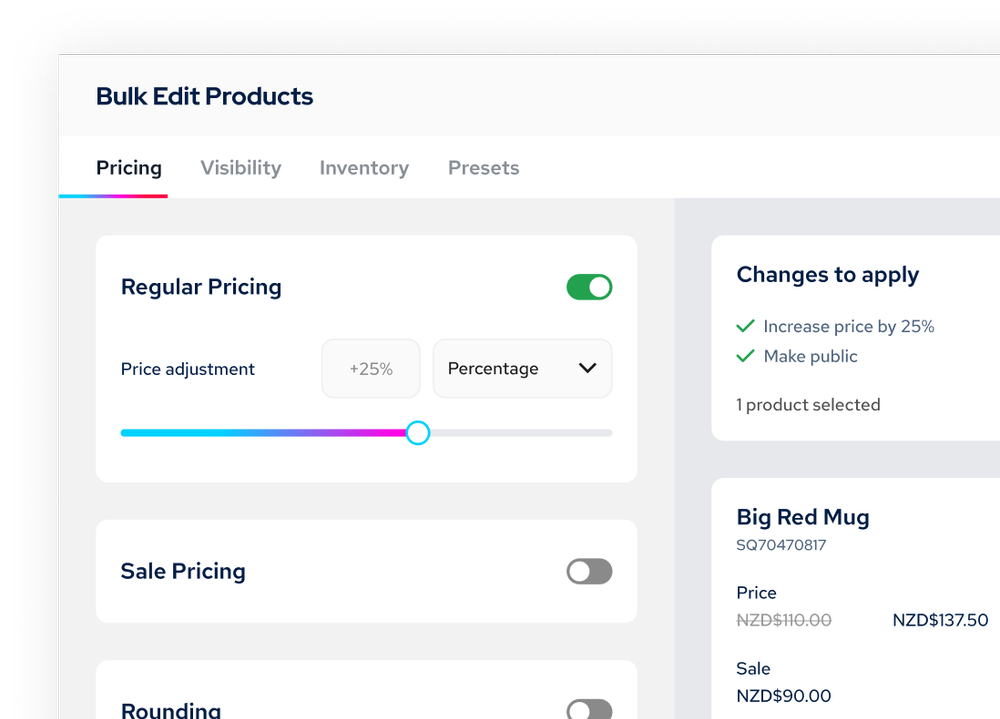
Cómo editar productos de forma masiva en Squarespace (sin exportar un archivo CSV)
Si alguna vez has intentado editar productos de forma masiva en Squarespace, ya sabes a qué me refiero. O bien vas seleccionando los productos uno por uno, o bien los exportas a un archivo CSV, los modificas en Excel y los vuelves a importar.
Funciona. Pero resulta un poco engorroso cuando hay que gestionar más de un puñado de productos.
Cuando esto realmente importa
Tienes que organizar una oferta con un 20 % de descuento en 30 productos. Eso supone 30 modificaciones individuales y 30 cálculos para asegurarte de que los precios sigan terminando en .99.
O bien, tus costes han subido un 10 % y tienes que subir los precios de 50 productos. Hola, aplicación de calculadora y una hora que ya no recuperarás.
O quizá quieras añadir «Colección de Navidad» a 40 productos para tu campaña de temporada. Haz clic, edita, guarda y repite.
Una vez más, no es imposible. Pero resulta tan tedioso que quizá prefieras saltártelo.
Responsable sénior de producto para Squarespace 7.1
SquareHero ha creado un complemento que te ofrece una vista tipo hoja de cálculo de todos tus productos directamente en Squarespace.
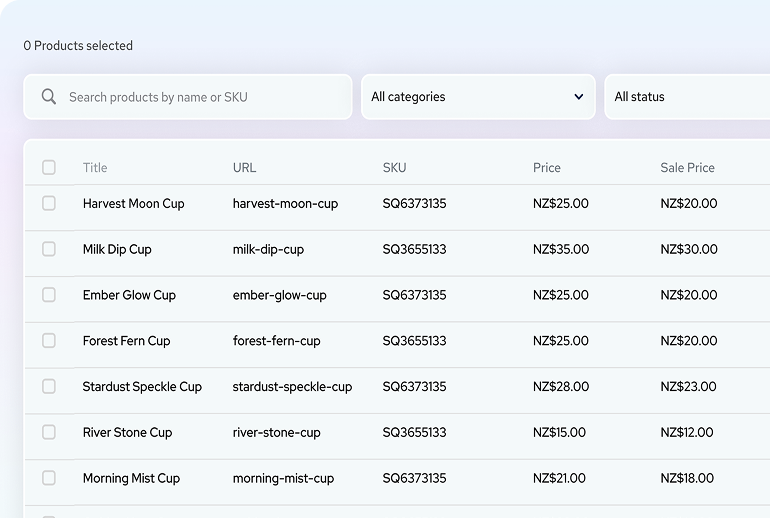
Esto es lo que realmente puedes hacer con él:
Selecciona varios productos y modifica los precios de una sola vez: aumentos porcentuales, importes fijos... lo que necesites.
Edita rápidamente los precios, los títulos de los productos y mucho más en la vista de hoja de cálculo sin tener que cambiar de producto.
Aplica terminaciones de precio uniformes (0,99; 0,95; números enteros) a todos los artículos que selecciones.
Añade o elimina categorías de varios productos a la vez.
Activa y desactiva los precios de oferta sin tener que modificar cada producto, incluso si los productos están ocultos o publicados.
Ejemplo real
Quieres poner 25 artículos en oferta con un descuento del 15 % y precios que terminen en 0,99.
Método habitual: Calcular y actualizar cada uno por separado. Quizás te lleve entre 15 y 20 minutos si te concentras.
Con el complemento: selecciona los 25, aplica un descuento del 15 %, configura el redondeo a 0,99, previsualiza y aplica. Tardarás unos 2 minutos.
No es revolucionario. Simplemente es mejor.
Gestión inteligente de las URL
Un detalle importante: cuando cambias los títulos de los productos, el sistema te sugiere que actualices las URL y crea automáticamente redirecciones. De este modo, no se rompen los enlaces existentes ni se perjudica el posicionamiento SEO al cambiar el nombre de los productos.
Modo de demostración
Aquí está lo mejor: puedes instalarlo primero en modo de demostración. Prueba todo con tus propios productos. Nada se publica hasta que estés listo. No hace falta tarjeta de crédito para el modo de demostración.
Puedes ver exactamente cómo funciona con TU tienda antes de comprometerte. Así es como debería ser.
¿Quién necesita esto?
Si tienes menos de 20 productos, probablemente no lo necesites.
Si gestionas más de 50 productos o tienes clientes con catálogos propiamente dichos, esto se vuelve bastante imprescindible.
Si vas a exportar archivos CSV más de una vez al mes, no lo dudes: hazte con esto.
Pruébalo
Instálalo en modo de demostración. Comprueba si se adapta a tu flujo de trabajo.
👉 Responsable de producto avanzado - Modo de demostración
Ofrecen un 20 % de descuento en los planes de un mes o un año con el código SAVE20 hasta el 31 de diciembre de 2025.
Si la edición en masa forma parte de tu flujo de trabajo habitual, esto simplemente hace que resulte menos molesto. A veces, con eso basta.