
Lo que conviene saber sobre el mundo de Squarespace.
Para diseñadores, desarrolladores y personas que crean negocios en torno a Squarespace.

Effortless Access to Squarespace’s Most Used Panels with Admin Quick Access
Esta publicación es una colaboración con BeyondSpace.studio
Navigating the Squarespace admin interface can be cumbersome for frequent tasks like accessing Code Injection or Custom CSS. The Admin Quick Access is here to streamline your workflow, offering a compact, auto-hiding button tailored for both Dashboard Mode and Frontend Mode.
Admin Quick Access is now managed through Ground Control for easier navigation and customization. Explore Ground Control
What Is Admin Quick Access?
Beyondspace’s Admin Quick Access is a productivity-boosting freebie designed to minimize clicks and maximize efficiency within Squarespace. By adding a sleek, auto-hiding toolbar to your interface, it provides quick access to frequently used admin panels, collections, and even your favorite custom links. With a seamless user experience tailored for both logged-in dashboard use and live site editing, it’s the perfect tool for developers, designers, and site owners looking to save time.
Two modes for maximum flexibility
1. Dashboard Mode

Squarespace Admin quick access - Dashboard mode
Dashboard Mode integrates directly with the Squarespace admin panel, making navigation across key areas effortless.
Características:
Core Admin Panels: Access Home, Code Injection, Custom CSS, Orders, and Site Styles instantly.
Collection Shortcuts: Quickly jump to any collection on your pages, including Blogs, Events, or Stores.
Custom Shortcuts: Bookmark frequently visited links with the toolbar’s built-in functionality.
Order Shortcut: Quickly land on Finance > Orders screen
Preview URL: Open current pages in a new tab with the primary domain, avoiding auto-login redirection.
2. Frontend Mode
With the retirement of the Escape Key Login feature in January 2024, Squarespace eliminated a convenient way to quickly access the admin editor while viewing your website. While this change prevents visitor confusion, it also removed a time-saving tool for site owners. To fill the gap, the Admin Quick Access offers an upgraded experience with Frontend mode, It offers quick editing access directly from your live site while staying invisible to visitors.
Cómo funciona:
When logged in, a toolbar appears in the top-right corner of your live site.
Click Edit Page to instantly open the Squarespace editor with the current page preloaded in the preview panel.
Logged-out users and site visitors will not see the toolbar.
Características:
Edit Page Button: Jump from live view to editing mode with one click.
Custom CSS & Code Injection: Landing on Custom CSS and Code Injection panel with the current live page in preview
Site Styles Preview: Adjust site styles while viewing the current page.
Home Button: Quickly return to the admin homepage.
Installation
Add the Code: Copy the Admin Quick Access snippet into the Footer Injection of your Squarespace admin panel.
Activate the Toolbar:
In Dashboard Mode, hover over the arrow at the top-right corner to reveal the toolbar.
In Frontend Mode, ensure you’re logged in to see the toolbar when viewing your live site.
Troubleshooting Primary domain access on Frontend Mode
If the toolbar doesn’t appear on your primary domain, it might be due to login information not being stored. Use the following URL parameters as a workaround:
Enable the toolbar:
your-website.com/?quickaccessDisable the toolbar:
your-website.com/?no-quickaccess

Admin Quick access frontend mode
Installation for Personal plan user
Follow this tutorial on how to install Beyondspace freebies on Personal plan Squarespace websites
Pro tip: If you are managing Squarespace websites on behalf of your clients and do not want them to see the Quick access toolbar, install it using the above method can make it available on your browser only, even the other logged-in users won’t see the toolbar.
Why Choose Admin Quick Access?
Beyondspace Admin Quick Access isn’t just a time-saver—it’s a smarter way to work. Whether you’re managing backend settings, adding custom styles, or editing your live site, this versatile tool adapts to your workflow. With its dual working modes and user-friendly features, it empowers you to focus on building your Squarespace site without getting bogged down in unnecessary clicks.
Ready to boost your Squarespace productivity? Install Admin Quick Access today and experience a faster, more efficient editing process.
Unveiling Our Most Searched Squarespace Templates
We analyzed 1034 Squarespace template searches to uncover the top categories and trends that are capturing users' attention. From captivating photography portfolios to robust e-commerce platforms, this deep dive reveals the preferences shaping the Squarespace landscape. Whether you're a designer, entrepreneur, or creative professional, these insights can guide you in selecting the perfect template for your website.
Methodology
We collected and categorized 1034 search queries from our template finder. Each query was assigned to one or more categories based on its content. The categories range from industry-specific needs like "Photography" and "E-commerce" to design preferences such as "Minimalist" and "Dark, Moody Templates."
Top Categories of Squarespace Template Searches
Below are the top categories based on the number of queries:
| Categoría | Number of Queries | Percentage of Total (%) |
|---|---|---|
| Miscellaneous | 101 | 12.2% |
| Art, Design & Creative Services | 75 | 9.0% |
| Fotografía | 68 | 8.2% |
| E-commerce & Online Stores | 64 | 7.7% |
| Coaching & Therapy | 61 | 7.4% |
| Business & Corporate | 56 | 6.8% |
| Health, Wellness & Fitness | 54 | 6.5% |
| Website Features & Design Styles | 53 | 6.4% |
| Food & Beverage | 49 | 5.9% |
| Travel & Vacation Rentals | 48 | 5.8% |
| Fashion & Beauty | 31 | 3.7% |
| Education & Tutoring | 29 | 3.5% |
| Entertainment & Media | 21 | 2.5% |
| Nature, Gardening & Foraging | 20 | 2.4% |
| Nonprofit & Charity | 18 | 2.2% |
| Inmobiliaria | 17 | 2.0% |
| Personal & Portfolio | 17 | 2.0% |
| Religion & Spirituality | 15 | 1.8% |
| Technology | 14 | 1.7% |
| Sports | 12 | 1.4% |
Let's delve into each of these categories to understand what users are looking for.
1. Art, Design & Creative Services
With 75 queries, this category tops the list, highlighting a significant demand for templates that cater to creatives. Users searched for:
Interior design templates.
Artist portfolios with interactive galleries.
Modern minimalistic designs for showcasing creative work.
Templates with bold and clean lines.
Why This Matters: Creative professionals seek templates that not only display their work elegantly but also reflect their unique style. Squarespace's design-focused templates cater well to this need.
2. Photography
Close behind, 68 queries focused on photography templates. Searches included:
Unique websites for photographers.
Templates for landscape photography.
Portfolio sites with options to sell prints.
Minimalist dark templates to make images pop.
Why This Matters: Photographers require visually stunning templates that prioritize imagery. Features like high-resolution galleries and fullscreen sliders are highly valued.
3. E-commerce & Online Stores
With 64 queries, this category reflects the growing trend of online businesses. Users looked for:
Templates for online merch stores.
E-commerce photography options.
Handmade shop templates.
Clean and inviting layouts with newsletter signups.
Why This Matters: E-commerce templates need to be user-friendly and conversion-focused. Features like product galleries, shopping carts, and easy navigation are essential.
4. Coaching & Therapy
This category saw 61 queries, indicating a strong interest in personal development services. Searches included:
Templates for therapists and psychotherapists.
Modern therapy websites with a warm feel.
Life and business coach templates.
Designs that are feminine, sparkly, and poised.
Why This Matters: Professionals in this field look for templates that convey trust, empathy, and professionalism. An inviting design can make potential clients feel comfortable reaching out.
5. Business & Corporate
With 56 queries, users sought templates suitable for various corporate needs:
Technology and IT consulting templates.
Financial advisor websites with clear calls to action.
Templates for marketing consultants and accountants.
Modern minimal designs for service providers.
Why This Matters: Business templates need to be professional and informative. Clear layouts, straightforward navigation, and strategic placement of contact information are key.
6. Health, Wellness & Fitness
This category shows a growing focus on personal well-being:
Nutrition Coach Templates: Seeking designs that promote a healthy lifestyle.
Beauty Provider Websites: Emphasizing visual appeal and elegance.
Mental Health Services: Requiring comforting and reassuring layouts.
Fitness Instructor Templates: Focusing on energy and motivation.
Why This Matters: Health and wellness professionals need templates that inspire trust and encourage action. Features like class schedules, appointment bookings, and testimonials are valuable.
7. Website Features & Design Styles
Users are specifically interested in certain functionalities:
Sidebar Navigation and Sticky Headers: Improving user experience.
Dark, Moody Templates: Seeking a specific aesthetic.
Parallax Scrolling and Countdown Timers: Adding modern interactive elements.
Lightbox Galleries and Video Integration: Enhancing content presentation.
Why This Matters: The right features can significantly impact user engagement and satisfaction. Templates offering these functionalities can meet diverse user needs.
8. Food & Beverage
Culinary businesses are looking for templates that whet the appetite:
Restaurant and Bakery Templates: Showcasing menus and ambiance.
Coffee Shop Websites: Creating cozy and inviting atmospheres.
Food Order Systems: Integrating online ordering and reservations.
Bright Templates for Restaurants: Using color to stimulate interest.
Why This Matters: In the food industry, visuals are key. High-quality images, easy-to-read menus, and straightforward contact information can attract more customers.
9. Travel & Vacation Rentals
The travel sector seeks templates that inspire wanderlust:
Vacation Rental Booking Sites: Needing calendars and availability features.
Hotel Websites with Booking Plugins: Simplifying reservations.
Travel Blogs and Planners: Sharing experiences and itineraries.
Luxury Templates for Airbnb Rentals: Enhancing property appeal.
Why This Matters: Travel templates must combine aesthetics with functionality. Interactive maps, image galleries, and booking integrations are essential.
10. Fashion & Beauty
This category focuses on style and aesthetics:
Hair Salon Sites: Showcasing services and styles.
Fashion Blogs for Teens: Requiring trendy and dynamic designs.
Makeup Artist Portfolios: Highlighting visual work.
Skincare E-commerce Sites: Combining product sales with informative content.
Why This Matters: In fashion and beauty, the website must reflect the brand's style. High-quality visuals and modern layouts are crucial for engaging visitors.
Analysis and Insights
Key Observations:
Creative Industries Dominate: The high number of searches in Art, Design & Creative Services and Photography suggests that creatives prefer Squarespace for its visually appealing templates.
Rise of E-commerce: The significant interest in E-commerce & Online Stores aligns with the global shift towards online shopping, especially in the wake of recent events pushing businesses online.
Focus on Personal Branding: The popularity of Coaching & Therapy templates indicates professionals are investing in personal branding and online presence.
Professionalism Matters: The consistent interest in Business & Corporate templates underscores the need for polished and professional websites in these sectors.
Key Features Users Value
Based on the queries, users are specifically looking for:
Visual Appeal: High-quality images, galleries, and portfolio layouts.
User-Friendly Navigation: Sidebar navigation, sticky headers, and minimal menus.
E-commerce Functionality: Shopping carts, product galleries, and secure payment options.
Responsive Design: Mobile optimization is a must-have feature.
Customization Options: Ability to adjust templates to fit personal or brand aesthetics.
Implications for Template Designers
Template designers can glean valuable insights:
Prioritize Visual Elements: Enhance templates with customizable galleries and image sliders.
Offer Niche Templates: Create templates tailored to specific industries like therapy, coaching, or niche e-commerce sectors.
Include Modern Features: Integrate functionalities like parallax scrolling, countdown timers, and lightboxes.
Ensure Flexibility: Design templates that are easily customizable to accommodate different content types and styles.

How to find video URLs on Squarespace and more
Learn how to access the URLs of Squarespace hosted videos and images
Esta publicación es una colaboración con BeyondSpace.studio
How Squarespace Delivers Your Videos
When you upload videos to Squarespace, they’re delivered through HLS format in various sizes. This enables Squarespace to deliver the ideal video tailored for each of your visitors. Simple enough, right? But if you're curious about the inner workings of this process or need a tool for grabbing video URLs easily, keep reading!
Understanding HLS Streaming
HLS streaming is a popular method for delivering video content across the internet. It works by breaking the video file into smaller chunks and serving them over HTTP. This allows for adaptive streaming, meaning that the quality of the video can change based on the viewer's internet speed and device capabilities.
When you upload a video to Squarespace—whether through a Video Block, Section Background, or Video Page—it's processed into multiple variants with different bitrates and resolutions. These are:
360p
1080p
This multi-resolution approach ensures that viewers with slower connections can still enjoy smooth playback without buffering issues.

HTML5 video element
Videos can be played in a browser using the HTML <video> element. When you specify the video source (such as .mp4, .webm, or .ogg) within the video tag, the browser begins downloading the video and will start playing it once enough data has been buffered.
If a user seeks ahead in the video, playback will only resume once all preceding bytes have been downloaded and played.
Here’s a basic example of the <video> element:
<video controls autoplay poster="video-thumb.jpg">
    <source src="vid.ogg" type="video/ogg">
    <source src="vid.mp4" type="video/mp4">
    Your browser does not support the video tag.
</video>
Key Points about HTML5 Video:
Single Source Download: In HTML5 video, only one version of the video source is downloaded at a time, regardless of the user's screen size.
Resource Management: If the video source dimensions exceed the screen size, the device must eliminate pixels to render the video accurately. This can lead to increased CPU and battery usage.
Network Limitations: If the video bitrate exceeds the available network bandwidth, playback may be disrupted, causing interruptions or stalling.
Squarespace video stream
When you upload videos to Squarespace, they are delivered via streaming. This streaming process involves the following key components:
The Master Playlist (playlist.m3u8)
The initial file sent to the video player is the master manifest file, usually referred to as playlist.m3u8. This file serves as a 'list' that showcases all the streams available for the video. Each stream version is listed separately, usually arranged from the lowest quality to the highest.
#EXTM3U
#EXT-X-VERSION:7


#EXT-X-STREAM-INF:BANDWIDTH=1124815,CODECS="avc1.64001e,mp4a.40.2",RESOLUTION=624x360
https://video.squarespace-cdn.com/content/v1/615d0bdeb9e47e1e585827d3/5847785e-97f9-4491-bde8-b9003fcb0afc/segments/mpegts-h264-624:360.m3u8?Expires=1727186774&Signature=OTgyNTRlMTQ4ODlhYmYzN2MzNzBlYTQ2MGU2OTc0ODdjZWVmMzJmMGM1MjU0OTgwNTFmYzM3MDUzYWNiMDNmNA
#EXT-X-STREAM-INF:BANDWIDTH=3089710,CODECS="avc1.640028,mp4a.40.2",RESOLUTION=1870x1080
https://video.squarespace-cdn.com/content/v1/615d0bdeb9e47e1e585827d3/5847785e-97f9-4491-bde8-b9003fcb0afc/segments/mpegts-h264-1870:1080.m3u8?Expires=1727186774&Signature=OTgyNTRlMTQ4ODlhYmYzN2MzNzBlYTQ2MGU2OTc0ODdjZWVmMzJmMGM1MjU0OTgwNTFmYzM3MDUzYWNiMDNmNA
Let’s dig deeper into the last 2 line, where it contains the definition of the fullHD stream (1080p)
#EXT-X-STREAM-INF:BANDWIDTH=3089710,CODECS="avc1.640028,mp4a.40.2",RESOLUTION=1870x1080
https://video.squarespace-cdn.com/content/v1/615d0bdeb9e47e1e585827d3/5847785e-97f9-4491-bde8-b9003fcb0afc/segments/mpegts-h264-1870:1080.m3u8?Expires=1727186774&Signature=OTgyNTRlMTQ4ODlhYmYzN2MzNzBlYTQ2MGU2OTc0ODdjZWVmMzJmMGM1MjU0OTgwNTFmYzM3MDUzYWNiMDNmNA
In this example:
BANDWIDTH: The required bandwidth to play this stream is approximately 3.09 Mbps.
CODECS: The video codec is
avc1, and the audio codec ismp4a.RESOLUTION: The resolution is 1870x1080.
The link provides access to the manifest for this stream, which will detail each segment's length and location.
Single Stream File
If we download the full HD stream file from the playlist.m3u8, we can see how the video is structured and delivered for efficient streaming.
At its core, a video stream is generated by dividing the video into smaller pieces known as segments. These segments are typically identified by a format associated with their encoding, such as MPEG-TS. The organization and naming of these segments are documented in a manifest file, usually with the .m3u8 extension, eg: mpegts-h264-1870:1080.m3u8
#EXTM3U
#EXT-X-VERSION:7
#EXT-X-TARGETDURATION:8
#EXT-X-MEDIA-SEQUENCE:0
#EXT-X-PLAYLIST-TYPE:VOD
#EXT-X-KEY:METHOD=AES-128,URI="https://video.squarespace-cdn.com/content/v1/615d0bdeb9e47e1e585827d3/5847785e-97f9-4491-bde8-b9003fcb0afc/key/f062487d84f8136d025d52cb0ecf2f96765d86b4069015a9c1a7fa2344e17b9f",IV=0xe2969d19ecb6d750fa458786617c6f75
#EXTINF:8.066667,
#EXT-X-BYTERANGE:1742208@0
https://video.squarespace-cdn.com/content/v1/615d0bdeb9e47e1e585827d3/5847785e-97f9-4491-bde8-b9003fcb0afc/segments/mpegts-h264-1870:1080
#EXTINF:4.800000,
#EXT-X-BYTERANGE:3025312@1742208
https://video.squarespace-cdn.com/content/v1/615d0bdeb9e47e1e585827d3/5847785e-97f9-4491-bde8-b9003fcb0afc/segments/mpegts-h264-1870:1080
#EXTINF:3.766667,
#EXT-X-BYTERANGE:1006368@4767520
https://video.squarespace-cdn.com/content/v1/615d0bdeb9e47e1e585827d3/5847785e-97f9-4491-bde8-b9003fcb0afc/segments/mpegts-h264-1870:1080
#EXT-X-ENDLIST
Below is the breakdown of the stream:
Header Information:
#EXTM3U: This line indicates that the file is an extended M3U playlist.#EXT-X-VERSION:7: This specifies the version of the playlist format.#EXT-X-TARGETDURATION:8: This indicates that the maximum segment duration should be 8 seconds.#EXT-X-MEDIA-SEQUENCE:0: This shows the sequence number of the first segment.#EXT-X-PLAYLIST-TYPE:VOD: This indicates that the playlist is for video on demand.#EXT-X-KEY:...: This line specifies the encryption method (AES-128)
Segment Information:
#EXTINF:8.066667,: This line indicates that the first segment has a duration of approximately 8.07 seconds.#EXT-X-BYTERANGE:1742208@0: This specifies that the segment will be delivered as a byte range starting from the beginning (0) with a length of 1,742,208 bytes. The URL following this line points to the segment data.
The subsequent
#EXTINFand#EXT-X-BYTERANGElines provide information about additional segments, including their durations and byte ranges.
Fast Forwarding
As previously mentioned, when working with MP4 files, skipping ahead requires downloading all prior content. However, with video streams, the player can intelligently request only the necessary segments.
Given the fullHD segment m3u8 playlist above: If you seek to t=13 seconds, the player evaluates the segments as follows:
First Segment: Covers from t=0 to approximately t=8.07 seconds.
Second Segment: Covers from t=8.07 to approximately t=12.87 seconds.
Since t=13 seconds is beyond the total duration of the first two segments, the player recognizes that it needs to access the third segment:
Third Segment: Starts at t=12.87 seconds and continues until its duration completes.
Therefore, the player can skip downloading the first two segments (0–12.87 seconds) and immediately request the third segment, which ensures a smoother playback experience without unnecessary buffering. This efficient handling allows users to seek ahead quickly and minimizes load times.
Adaptive streaming on Squarespace
The power of adaptive streaming shines brightly when using Squarespace’s video capabilities. With HLS (HTTP Live Streaming), the video player can dynamically adjust the quality of the stream based on real-time network conditions.
When a viewer starts watching a video, the player assesses the available bandwidth and begins playback with the most suitable resolution. If the network speed fluctuates, the player can seamlessly switch between different quality levels.
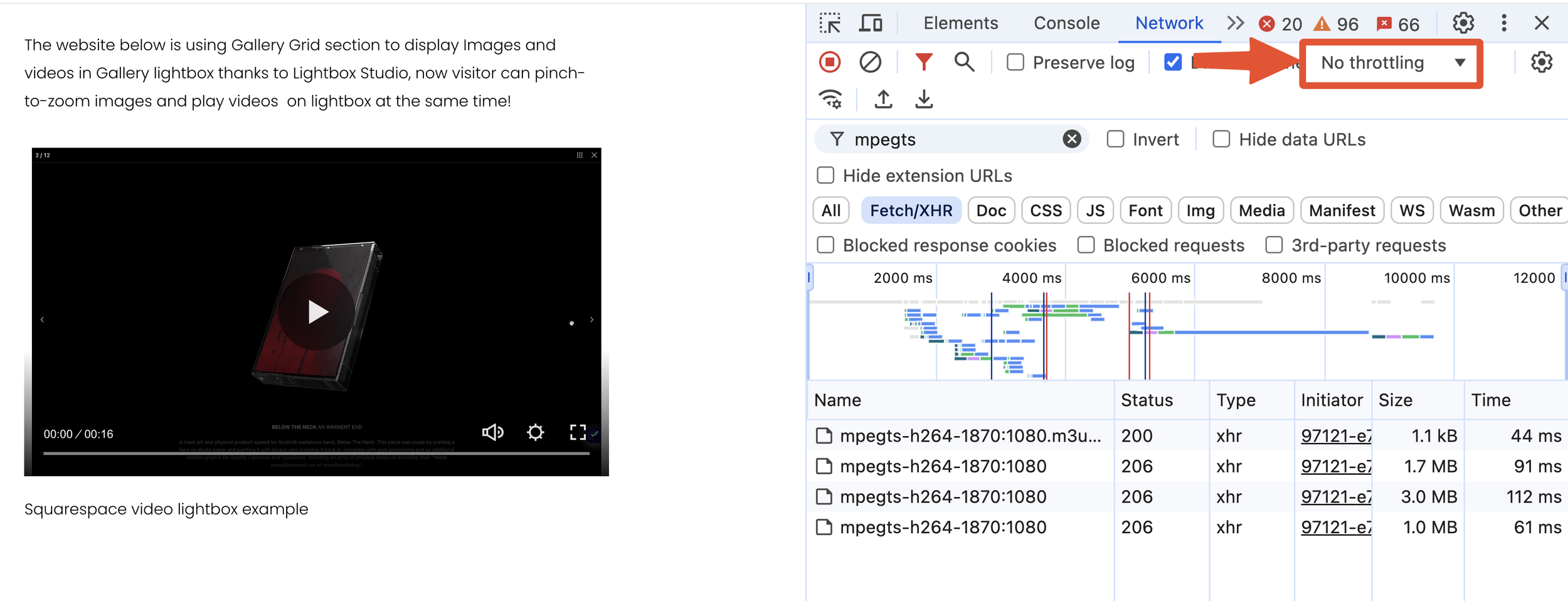
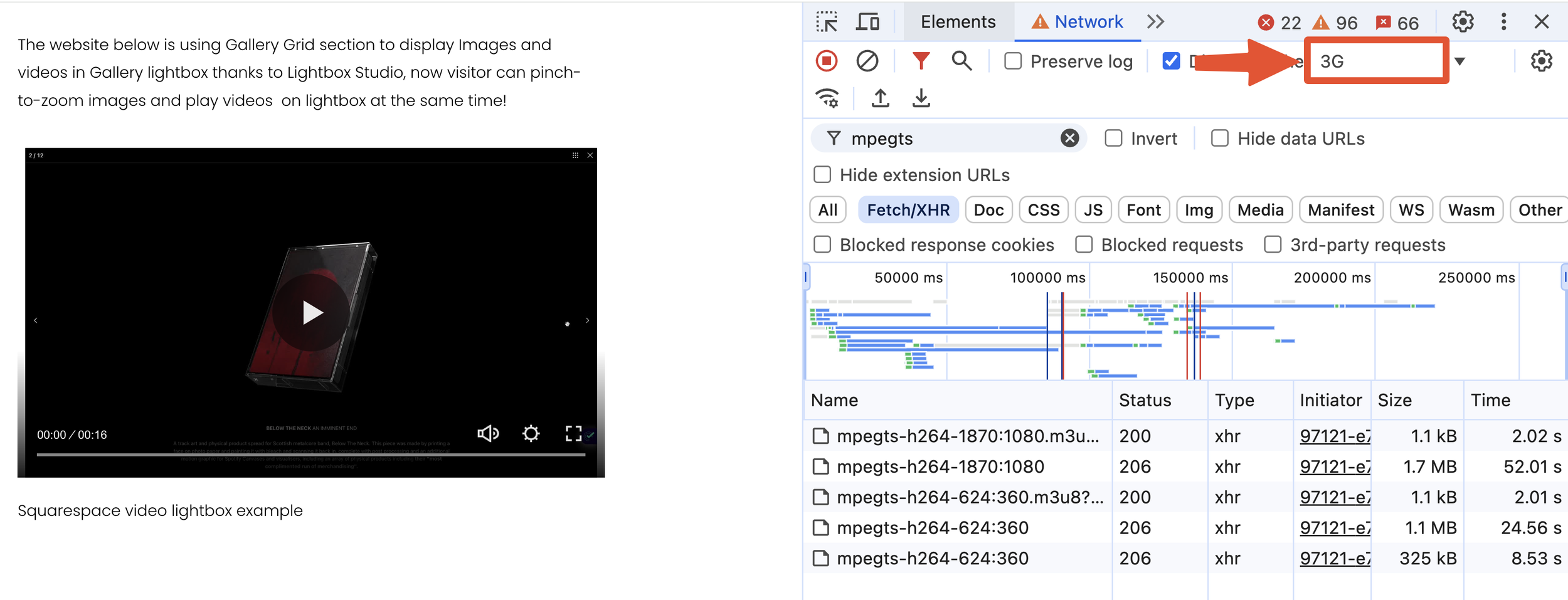
For example, when I simulated a 3G network speed, the player automatically switched from 1080p to 360p to ensure smooth playback. This seamless transition allows viewers to enjoy content without interruptions.
Check the screenshots below for a visual reference of this adaptive quality adjustment in action:
No Throttling Mode: The 1080p segments have been loaded.
Network Throttled to 3G Speed: The 360p segments have replaced the 1080p counterparts.
Limitations of Video Streaming on Squarespace
Videos uploaded to Squarespace can automatically display at either 1080p or 360p based on the user's device, browser, and internet connection. However, there is no option for users to manually select which resolution to display. This lack of control can lead to situations where the background video appears blurry on mobile devices.
It's important to note that while you can upload 4K videos to Squarespace, they will be resized and displayed at a maximum resolution of 1080p.
Every Squarespace website can have up to 30 minutes of uploaded video. If you need more storage, subscribe to a Digital Products plan. For more information about Squarespace's video requirements, check this page.
If you're interested in exploring other methods for uploading video to Squarespace, refer to this detailed tutorial from the Beyondspace blog.
Accessing the playlist URL for Squarespace videos
Now that you have a solid understanding of Squarespace streaming, you might see why the URLs for uploaded videos no longer appear in traditional formats like MP4 or OGG. Instead, they are provided in HLS format, which allows for adaptive streaming and better performance across varying network conditions.
You may find yourself in a variety of situations where grabbing the URL for your videos becomes useful. For instance, if you want to share it with colleagues/clients for collaboration, having direct access to the HLS video URL simplifies the process. Moreover, if you're a developer looking to integrate videos into a custom application or solution on your Squarespace website, accessing the HLS URL can be incredibly beneficial. This capability enhances your flexibility and control over how and where your video content is used.
Asset library enhancer
Beyondspace has introduced a free tool called Asset Library Enhancer, featuring a unique capability that allows you to copy the URLs of videos and images uploaded to Squarespace directly from the context menu. This enhancement is designed to streamline your workflow, making it easier than ever to access and share your media files seamlessly.
Asset Library Enhancer is now managed through Ground Control for easier navigation and customization. Explore Ground Control
How to use the new Copy URL feature:
First, copy the snippet for the Asset Library Enhancer into your Footer injection.
Go to your site's Asset Library at
/config/asset-libraryfrom your Squarespace dashboard.Ensure the Library Layout is set to List.
Click on the Context Menu of Each Row Item to access the Copy URL button: For each image or video, click on the three dots (context menu) next to the item to find these options.
Copy Image URL: This will grab the image link and video thumbnail URL to your clipboard.
Copy Video URL: This will grab the real URL of the video to your clipboard. Note that if the video is not used anywhere on your page, the video URL may not be usable. In such cases, you may see a message indicating that the video is not playable and suggesting you embed the video elsewhere to make the URL accessible.
Conclusión
HLS has a number of advantages over the native HTML5 <video> tag. Responsive by default, it ensures that less data is wasted by serving a video that is too large for a small screen. Additionally, its adaptive capabilities mean that fluctuations in network speed are less likely to impact playback quality.
Squarespace uses HLS under the hood. Every video creation response includes the m3u8 URL for the stream, so the small tool from Beyondspace can help you quickly grab those playlist URLs of videos and use them for your own needs.