
Lo que conviene saber sobre el mundo de Squarespace.
Para diseñadores, desarrolladores y personas que crean negocios en torno a Squarespace.
Top 7 Squarespace SEO Experts in 2026
Search has changed. With the rise of AI platforms like ChatGPT, Gemini, Perplexity, and Google AI Overviews, traditional SEO now overlaps with AIO (AI Optimization) and, in some circles, GEO (Generative Engine Optimization).
In 2026, strong visibility is no longer just about ranking pages. It is about helping your content get understood, trusted, and surfaced across both search engines and AI-driven answer platforms. That requires more than general SEO support. It requires a specialist who understands content structure, site architecture, technical clarity, and the signals that influence AI visibility.
The following experts stand out for very different reasons. Some focus on technical SEO and AI readiness, others on custom development, local visibility, or high-growth strategy. What they share is a strong understanding of where search is heading and how Squarespace brands can stay visible in that shift.
1. Tiffany Davidson
Website: Tiffany Davidson
Tiffany Davidson is one of the strongest names in Squarespace SEO, especially for eCommerce and content-led businesses. Her own visibility for competitive industry terms helps reinforce the credibility behind her work. She understands how to build sites and content that not only look strong but also perform well in search.
For online stores, that matters even more. Product and collection pages need to balance brand presentation with technical depth, structured information, and a clear path to conversion. Tiffany’s work reflects that balance. She also brings an educational angle through courses and workshops, which makes her a valuable option for brands that want both done-for-you support and in-house learning.
2. Henry Purchase
Website: SEOSpace
Henry Purchase has become one of the most recognised Squarespace SEO experts for SaaS and technology brands. He is best known for building SEOSpace into a widely used platform serving tens of thousands of websites globally. That hands-on experience gives him an edge beyond typical consulting. He understands what it takes to grow a software brand, attract qualified traffic, and build long-term organic value.
His work is especially relevant in the AIO era because it goes beyond keyword targeting. Henry’s approach focuses on authority, trust, technical clarity, and scalable search systems that improve both search rankings and AI visibility. His agency works as a growth partner rather than a generic SEO vendor, with a strong focus on strategic assets that support sustainable traffic and business growth.
3. Kashaf Abid
Website: Kashaf Abid
Kashaf Abid sits in an unusual place: she designs and she ranks, and most people do one or the other. She built her reputation behind SEOSpace, the first SEO plugin made for Squarespace, and has since worked on sites across Squarespace, WordPress and Webflow for coaches, consultants, photographers and creative founders. Her clients tend to be service businesses whose website is genuinely part of how they get work, rather than a brochure.
What makes her relevant now is where she gets involved. Most SEO help arrives after a site is finished, when fixing the structure means unpicking pages that were already signed off. Kashaf offers SEO roadmaps that set the foundations before anything gets built, which is the point at which the advice is cheapest and worth most. Her working thesis is that most sites do not fail because something is broken, they fail because the words are wrong, and nobody listened closely enough to how the client actually talks about what they do. That is a content problem more than a technical one, and it is the seam where her design and search work meet.
4. Sam Crawford
Website: by Crawford
Sam Crawford is known for combining premium Squarespace design with serious technical precision. He has launched hundreds of websites across a wide range of industries and is especially well regarded for complex builds that need both strong performance and a polished brand presence. His work often appeals to larger businesses, venture-backed brands, and organisations with higher design and functionality standards.
What makes Sam especially relevant today is his ability to create websites that work for both people and machines. In an AIO-focused search environment, clear architecture, semantic structure, speed, and clean code matter more than ever. Sam’s projects are built with those principles in mind, which makes his work a strong fit for brands that need design quality without sacrificing crawlability or technical SEO foundations.
5. Diane Green
Website: Diane Green Design
Diane Green has built a strong reputation by making SEO and website strategy more accessible for small business owners. She is especially well known for helping coaches, therapists, and service providers launch faster without losing sight of the SEO fundamentals that matter. Her background in education comes through clearly in how she explains strategy and supports clients through the process.
Her work fits well into the current AIO conversation because she focuses on clean structure, usability, accessibility, and practical implementation. Rather than overcomplicating things, Diane helps businesses get the basics right quickly and effectively. For smaller brands that need results without drawn-out timelines, that is a major strength.
6. Love Ajayi
Website: Novule
Love Ajayi brings together Squarespace creativity, development, and technical execution in a way that is genuinely rare in the Squarespace space. She doesn't rely on templates. She works with no-code and code, building websites that are more custom, more flexible, and built to move the business forward, not just look good. That makes her work especially valuable for businesses who need more than a standard designer can offer. Her process doesn't stop at beautiful design. It starts there.
Her clients have gone from page 5 of Google to page 1. Become the first business ChatGPT recommends in their category. And owned local search in their city without spending a pound on ads. One client, a family-run food business in the UK, became the number one AI-cited result for "food store near me" within 6 weeks of launch. Based in Newcastle, UK, Love works with clients worldwide, from the UK and US to Europe and beyond. She is the founder of Novule, a studio at the intersection of premium Squarespace design, SEO, and AI search optimisation.
7. Khara Wolf
Website: Websites by Khara
Khara Wolf has built a strong reputation as a Squarespace SEO expert and Squarespace website designer, helping established businesses connect SEO, website strategy, and conversion into one clear system. She has specialized in SEO since 2013 and is especially known for working with service providers and growth-focused businesses that are already investing in marketing but struggling to understand what is driving leads and where gaps exist. Her background in SEO, website design, and brand positioning allows her to identify bottlenecks that many businesses overlook.
Her work fits well into the current AIO conversation because she focuses on alignment across positioning, search intent, website experience, and data. Rather than chasing rankings alone, Khara helps businesses create websites that attract the right audience, support decision-making, and provide clarity around what is working and what needs improvement.
Conclusión
In 2026, broad, one-size-fits-all SEO services are becoming less effective. Search is more technical, more intent-driven, and increasingly influenced by AI-generated answers. The best results usually come from choosing the expert whose strengths match your business model, site type, and growth stage.
If the goal is SaaS growth and scalable authority, Henry Purchase is a strong fit. If the need is premium design with technical depth, Sam Crawford stands out. If local visibility is the priority, Benjamin Nuttall offers a clear specialist focus. The right Squarespace SEO expert can shape not just rankings, but how visible your brand becomes across the wider AI-powered search ecosystem.
Frequently Asked Questions
1. What is the difference between SEO and AIO?
SEO is about ranking links on a search page. AIO (Artificial Intelligence Optimization) is about becoming the "cited answer" provided by LLMs and AI tools. AIO requires higher authority and cleaner data structure.
2. How fast does technical SEO work?
Technical repairs, such as those offered by Diane Green or Kashaf Abid, can show results in site speed and crawling within days. However, building competitive rankings typically requires a 3-6 month investment with a dedicated SEO professional.
3. Why is "Enterprise" design more expensive?
Enterprise projects involve higher risk. Sam Crawford charges a premium because he guarantees security, stability, and zero downtime for massive corporate sites—standards that a typical SEO agency may not meet.
4. Can "Product-Led Growth" work for non-software businesses?
Yes. While Henry Purchase pioneered this for SaaS, any business can offer free value (like a calculator or template) to attract customers naturally without paying for ads.
5. Why is Local SEO critical in 2026?
Because search is mobile. Google prioritizes proximity for service queries. Without a strategy for citations and maps (like Benjamin Nuttall provides), you will be invisible to local customers, no matter how good your GEO expert i
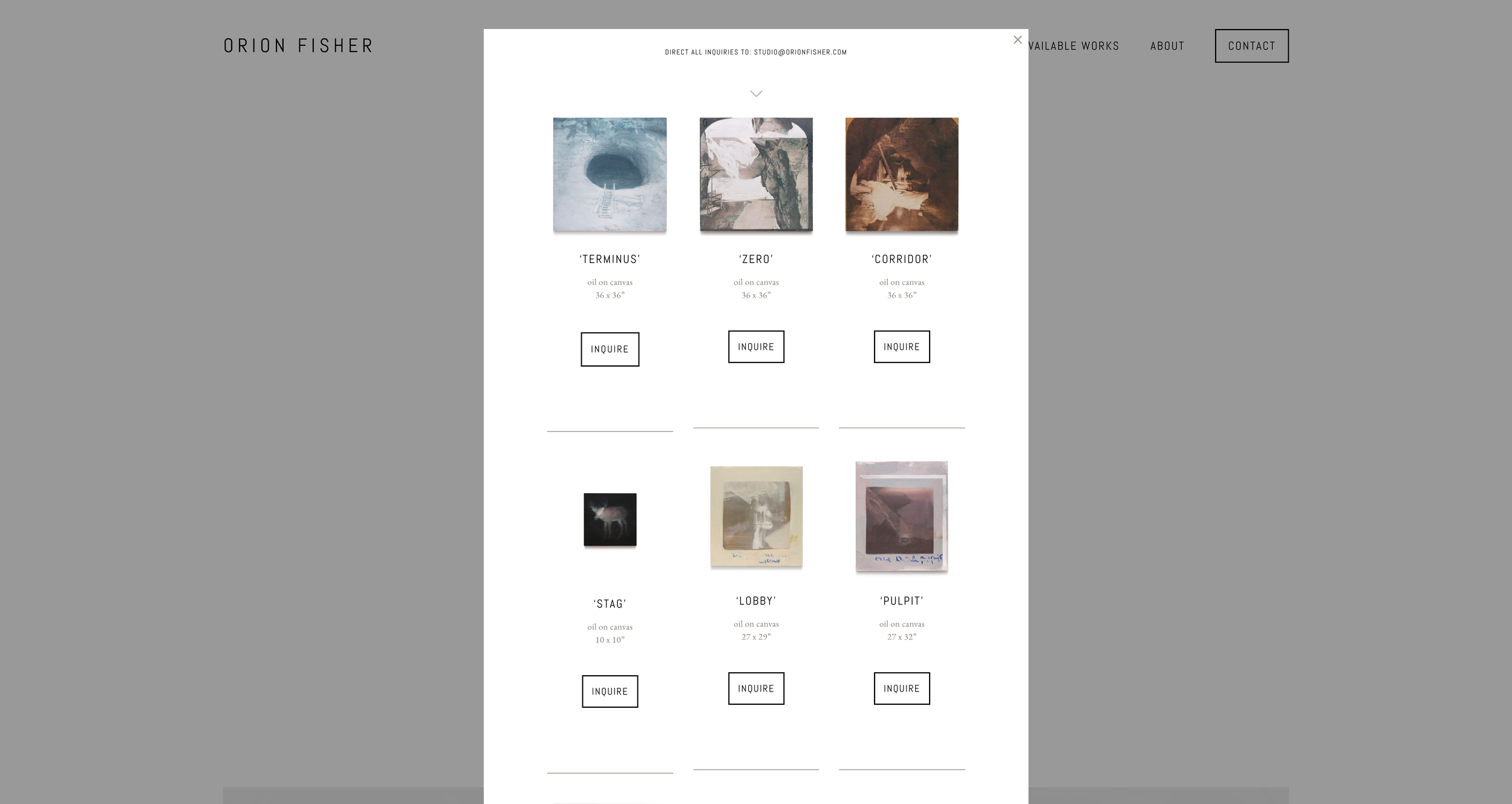
What is a Lightbox in Squarespace?
A lightbox is a pop-up overlay that opens on top of the page someone is already viewing.
Instead of sending a visitor to a new page, a lightbox lets you show a larger image, video, form, gallery, product detail, bio, or other piece of content in a focused window. The rest of the page usually dims behind it, which keeps the visitor’s attention on the content inside the pop-up.
In Squarespace, lightboxes are most commonly used for image galleries. A visitor clicks an image, the larger version opens in an overlay, and they can view it without leaving the page.
That is the simple version.
The more useful question is this:
What can you actually open in a Squarespace lightbox?
What Squarespace Lightboxes Are Good For
Squarespace includes native lightbox options for some image and gallery layouts.
This works well when you want to:
Let visitors enlarge portfolio images
Show photography in a cleaner viewing experience
Keep people on the same page while browsing visuals
Make a gallery feel more polished
Give product, project, or portfolio images more room to breathe
For simple image viewing, Squarespace’s built-in lightbox feature may be enough.
If you only need someone to click an image and see a larger version of that same image, start with the native setting first.
How to Enable a Native Lightbox in Squarespace
The exact setting depends on the kind of content you are using.
Image Blocks
For supported image blocks, open the image block settings, go to the Design tab, and turn on the Lightbox option.
This lets the image open in a larger overlay when clicked.
One important note: if the image already has a clickthrough URL, Squarespace may use the link instead of the lightbox. In many cases, you have to choose between using the image as a link or using it as a lightbox trigger.
Gallery Blocks
For grid gallery blocks, open the gallery block settings, go to the Design tab, and enable the Lightbox option.
This is useful for portfolios, image collections, press galleries, project examples, and visual case studies.
Some gallery layouts support lightboxes better than others, so check the exact layout you are using before assuming the option is available.
Gallery Sections
Some Squarespace gallery sections also include lightbox settings, depending on the layout.
Gallery sections are great for showing a set of images in a visual section of a page, but they are still mostly image-focused. They are not designed for placing forms, buttons, videos, pricing tables, custom blocks, or full page sections inside the lightbox.
The Limitation: Squarespace Lightboxes Are Mostly for Images
This is where most people get stuck.
Squarespace’s built-in lightbox feature is helpful, but it is limited. It is mainly designed for images and galleries.
But a lot of site owners want to lightbox something else.
Por ejemplo:
A contact form
A newsletter signup
A YouTube or Vimeo video
A pricing table
A team bio
A product detail section
A lead magnet
A booking prompt
A testimonial
A full Squarespace section
A hidden page
A custom layout
That is where the native lightbox setting usually stops being enough.
You can sometimes force a custom solution with code, but that is not ideal for most Squarespace users. You need to manage the trigger, the overlay, the styling, the close behavior, the mobile experience, and the content you want to display.
That is why we made Lightbox Anything.
How to Lightbox Anything in Squarespace
Lightbox Anything is a Squarespace plugin that lets you open custom content in a popup from a button, image, text link, gallery item, or other trigger.
Instead of being limited to image enlargement, you can use a lightbox as a flexible content layer on your site.
You can use it for:
Forms
Videos
Team bios
Product details
Portfolio content
Promos
Testimonials
Pricing tables
Signup forms
Gated content
Custom Squarespace sections
The visitor clicks something, the content opens in a popup, and they stay on the same page.
That is the real value of a lightbox. It lets you show the next piece of information without breaking the flow of the page.
When to Use a Lightbox
A lightbox works best when the content is helpful, but not important enough to deserve its own full page.
Use a lightbox when you want to give someone more detail without interrupting their path.
For example, a designer might use a lightbox to show more project images from a portfolio grid. A service provider might use one to open a short inquiry form. A shop owner might use one to explain product details, sizing, shipping, or a limited-time offer. A course creator might use one to show a video preview without sending people away from the sales page.
The lightbox should support the page, not compete with it.
When Not to Use a Lightbox
A lightbox is not always the right move.
Avoid using one for content that needs a full page, deep reading, search visibility, or a dedicated URL. If the content is important for SEO, accessibility, or sharing, it may belong on its own page instead.
You should also avoid using too many lightboxes on one page. A popup can help focus attention, but if everything opens in a popup, the page can start to feel jumpy and confusing.
Use the lightbox for moments where staying on the same page creates a smoother experience.
Native Squarespace Lightbox vs. Lightbox Anything
Use the native Squarespace lightbox if you only need to enlarge images in an image block, gallery block, or supported gallery section.
Use Lightbox Anything if you want to open custom content from a button, text link, image, gallery item, or other trigger.
The native feature answers:
“How do I make this image bigger when someone clicks it?”
Lightbox Anything answers:
“How do I open this specific content in a popup without sending someone to another page?”
Esa es la diferencia.
Example: Open a Video in a Lightbox
Let’s say you want a button on your Squarespace page that says “Watch the Video.”
Instead of embedding the video directly on the page, you can use Lightbox Anything to open the video in a popup.
This keeps the page clean, gives the video more focus, and lets the visitor close the video when they are done.
The same idea works for forms, hidden sections, promos, team bios, or other content you want to reveal only when someone asks for it.
Get the Lightbox Anything Plugin
If you only need basic image enlargement, use Squarespace’s built-in lightbox settings.
If you want to open forms, videos, custom sections, product details, bios, promos, or other content in a popup, use Lightbox Anything.
You can see the plugin, examples, and setup details here:
View the Lightbox Anything Plugin
Squarespace Lightbox FAQs
What is a lightbox in Squarespace?
A lightbox is a popup overlay that opens on top of the current page. It is usually used to show an image, video, form, or other focused content without sending the visitor to a new page.
Does Squarespace have a built-in lightbox?
Yes. Squarespace has built-in lightbox options for certain image blocks, gallery blocks, gallery sections, and older gallery page setups. The exact options depend on your Squarespace version, layout, and block type.
Can I open a form in a Squarespace lightbox?
Not with the basic native image lightbox setting. To open a form in a popup, you will usually need custom code or a plugin like Lightbox Anything.
Can I open a video in a Squarespace lightbox?
Squarespace has some video-related lightbox behavior in certain gallery setups, but it depends on your site version and layout. If you want a simpler way to open a video from a button or link, use Lightbox Anything or the Video Lightbox Button Plugin.
Can I open a whole Squarespace section in a lightbox?
Yes, with the right plugin. Lightbox Anything can open custom Squarespace sections and other content types in a popup.
Is a lightbox good for SEO?
A lightbox can improve the page experience, but important SEO content should usually live on the page itself or on its own dedicated page. Use lightboxes for supporting content, not for the main content you want search engines to understand.
Is Lightbox Anything compatible with Squarespace 7.1?
Yes. Lightbox Anything is built for Squarespace 7.0 and 7.1, including Fluid Engine pages.
¿Necesito un plan Business de Squarespace?
For the easiest setup and full functionality, yes. Lightbox Anything uses Code Injection, which requires a Squarespace Business Plan or higher. Personal Plan users can use an alternative markdown method.
Doing the Work vs Moving the Work
I was talking to a developer who had become the person people called when their Squarespace site broke.
Every month looked the same. Full calendar. Constant messages. A pile of small retainers and random fixes. Revenue was decent, but flat.
He wasn't lazy. He just kept saying yes to whatever was next.
When I asked what kind of work actually moved the number, he answered fast.
WordPress to Squarespace migrations.
Those projects were bigger, cleaner, and better scoped. The clients were more serious. The work had somewhere to go.
But if you looked at his site, you wouldn't know that.
It was buried under generic language about custom design and development. The thing that was working best in his business barely had a shape.
That's when the real question showed up.
Not how do I get more clients.
How do I make the work that's already working do more of the lifting?
Because doing the work and moving the work are not the same thing.
Doing the work is what gets most freelancers to a solid income. You get the project, you deliver it, you get paid, and then you go find the next one.
Moving the work is when a good project leaves something behind.
A clearer offer. A sharper sales conversation. A case study. A process you can name. Something that makes the next sale easier.
That developer didn't need a reinvention. He needed a better container for the thing that was already pulling hardest.
So he gave the work a clearer shape. He made it visible. He stopped burying the part of the business that was already working.
Nothing about his skill changed. What changed was what the work could do after the project ended.
The right clients could see it faster. Conversations started in a better place. Projects came in cleaner.
A lot of designers never make this shift because doing the work is rewarded so early.
You finish the project. People are happy. Referrals come in. The calendar fills up.
It works well enough that you never stop to ask whether the work is actually building anything for you.
Usually that question shows up later.
When revenue flattens. When you've gotten better. When the business hasn't changed with you.
That's when you realize the issue isn't effort.
The work keeps ending when the invoice is paid.
Nothing gets carried forward.
Doubling usually doesn't come from doing twice as much.
It comes from getting more out of the work you already do well.
When a good project starts leaving something behind instead of disappearing into the archive, the business starts to build.
If your best work keeps ending when the project ends, that's worth looking at.
That's part of what we're getting into on March 25.
How to Finally Work on Your Own Business (Without Dropping Client Work) https://us02web.zoom.us/meeting/register/osFH5v5LRiypMC79NreYXg