
Lo que conviene saber sobre el mundo de Squarespace.
Para diseñadores, desarrolladores y personas que crean negocios en torno a Squarespace.

Reseña de Sendowl: 10 razones por las que nos encanta para vender productos digitales
Si alguna vez has buscado en Google «¿Cómo puedo vender un PDF por Internet?» o le has preguntado a ChatGPT «¿Cuál es la forma más fácil de vender productos digitales?», una de las primeras respuestas que encontrarás es SendOwl.
No conocí SendOwl por anuncios ni por el bombo publicitario. Lo descubrí hace años mientras compraba libros electrónicos en PersonalityHacker.com. El proceso de pago fue rápido, sencillo y fluido: exactamente el tipo de experiencia que quería ofrecer a mis propios clientes.
En enero de 2018, tras analizar las ventajas y los inconvenientes de Gumroad y SamCart, SendOwl se impuso. Me ofrecía el equilibrio perfecto entre control, sencillez y coste. Desde entonces, hemos fact urado más de un millón de dólares a través de la plataforma, y puedo afirmar con total seguridad que, en lo que respecta a los productos digitales, ha supuesto un cambio revolucionario.
Te lo explico a continuación.
Por qué nos pasamos a SendOwl
La respuesta breve: control y conversiones.
Squarespace Commerce nos iba bien para los productos físicos, pero cuando empezamos a desarrollar un negocio en torno a productos digitales —libros electrónicos, plantillas, suscripciones—, enseguida nos pareció que tenía limitaciones.
SendOwl nos proporcionó:
Una experiencia de pago acorde con nuestra marca.
Más formas de aumentar los ingresos por cliente.
Herramientas de marketing integradas que, normalmente, supondrían un coste adicional.
Para nosotros, eso se tradujo en menos obstáculos, más ventas y más ingresos recurrentes.
10 funciones que realmente te ayudan a ganar más dinero
1. Proceso de pago sin complicaciones → Mayor tasa de conversión
Cuando los clientes no tienen que lidiar con un sinfín de formularios, compran más. El proceso de pago en ventana emergente de SendOwl, que se realiza en dos clics, prescinde de los datos de envío y de cualquier elemento que distraiga. Notamos un aumento inmediato en los pedidos completados la misma semana en que lo implementamos.
2. Identidad de marca personalizada → Confianza profesional
Las redirecciones minan la confianza. SendOwl permite que el proceso de pago tenga el mismo aspecto y la misma sensación que tu sitio web. Esa experiencia de marca fluida evita que los clientes se lo piensen dos veces antes de realizar la compra.
3. Ventas adicionales con un solo clic → Pedidos más grandes
Tras finalizar la compra, SendOwl puede sugerir al instante un producto relacionado. Solo esa función ha aumentado en más de un 20 % el valor medio de nuestros pedidos. Es como encontrar dinero que no sabías que tenías.
4. Recuperación del carrito → Ventas guardadas
Los carritos abandonados ya no suponen ventas perdidas. SendOwl envía automáticamente un correo electrónico a las personas que no completan el proceso de pago, animándolas a volver. Esas «segundas oportunidades» nos devuelven ingresos reales a nuestra cuenta.
5. Integraciones de correo electrónico → Valor a largo plazo
SendOwl se integra directamente con ConvertKit, Mailchimp y otras plataformas. Esto significa que cada cliente queda registrado en tu sistema de correo electrónico, listo para ventas adicionales, lanzamientos de productos y futuras ofertas.
6. Programa de afiliados → Otros venden por ti
¿Por qué hacerlo todo tú solo? SendOwl cuenta con un sistema integrado de seguimiento de afiliados para que tus clientes, seguidores y socios puedan promocionar tus productos, sin necesidad de utilizar ningún otro programa.
7. Paquetes de productos → Mayor valor percibido
Los paquetes hacen que los productos digitales parezcan una «ganga». Hemos agrupado plantillas y guías y hemos visto cómo el valor medio de los pedidos ha aumentado sin ningún esfuerzo adicional.
8. Cuotas de socio y suscripciones → Ingresos recurrentes
Los compradores ocasionales están bien. Pero los suscriptores son mejores. SendOwl facilita la venta de membresías o suscripciones, de modo que los ingresos llegan cada mes con total regularidad.
9. Actualizaciones automáticas de productos → Mejor experiencia
Los productos digitales evolucionan. Con SendOwl, cuando actualizas un archivo o una plantilla, los clientes reciben automáticamente la nueva versión. Esto fomenta la fidelidad y hace que los clientes vuelvan a comprar.
10. Protección de contenidos → Tranquilidad
Los límites de descarga, las fechas de caducidad y la publicación gradual del contenido protegen tu propiedad intelectual. Puedes vender con confianza, sabiendo que tu trabajo no se está difundiendo de forma gratuita.
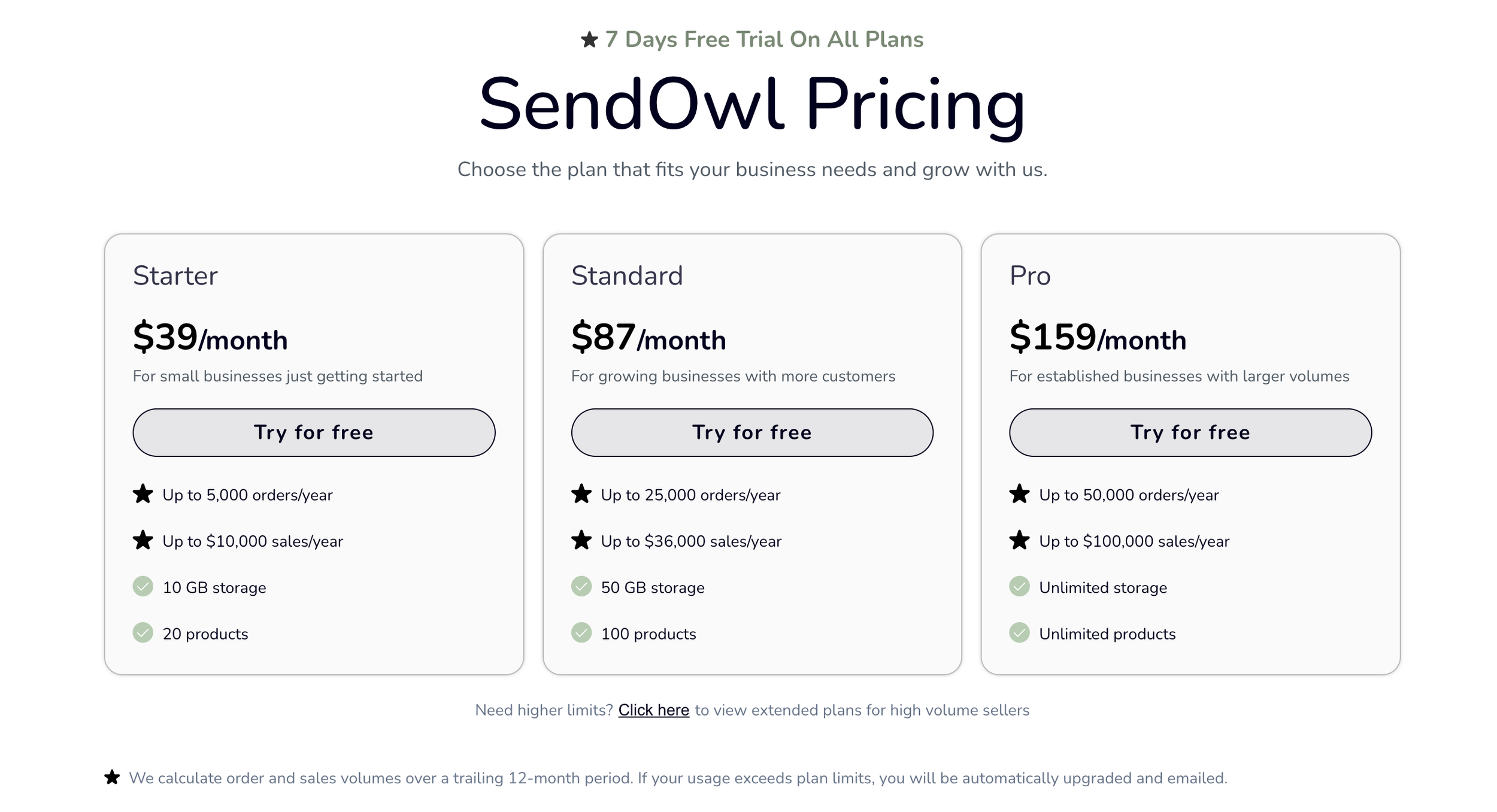
Si se combina esto con un plan Business de Squarespace, el coste total debería ser inferior a 50 dólares al mes, es decir, más o menos lo que cuesta el plan Advanced Commerce.
Cómo integrar Sendowl con Squarespace
Cuando creas un producto en Sendowl, puedes utilizar el enlace de pago para crear tus propios botones de compra y páginas de producto. De nuevo, es muy flexible.
Preguntas frecuentes (FAQ) sobre SendOwl
¿Cómo funciona SendOwl?
SendOwl es una plataforma de ventas digitales fácil de usar. Cuando un cliente compra un producto digital, SendOwl le envía automáticamente un enlace de descarga seguro. Además de la entrega, ofrece herramientas de marketing, análisis, ventas adicionales y gestión de afiliados, lo que la convierte en una solución de ventas completa.
¿SendOwl es de pago?
Sí. SendOwl ofrece varios planes de precios que oscilan entre los 9 y los 39 dólares al mes, diseñados para adaptarse a empresas de diferentes tamaños y volúmenes de ventas.
¿Puedo vender productos físicos en SendOwl?
Sí. Aunque está diseñado para productos digitales, SendOwl también permite la venta de productos físicos.
¿Existen restricciones en cuanto a los tipos de archivos que puedo vender?
No. SendOwl admite una amplia variedad de formatos de archivo, entre los que se incluyen .doc, .exe, PDF, imágenes, vídeos y muchos más.
¿Dónde tiene su sede SendOwl?
SendOwl se fundó en Londres, Reino Unido, y opera a nivel mundial.
¿SendOwl es una pasarela de pago?
No. SendOwl no es en sí mismo una pasarela de pago. En cambio, se integra a la perfección con Stripe, PayPal y otras pasarelas populares para gestionar el procesamiento de los pagos.
¿Tiene SendOwl una aplicación?
SendOwl no cuenta con una aplicación independiente propia. Sin embargo, se integra con Shopify a través de una aplicación específica disponible en la tienda de aplicaciones de Shopify.
¿Qué comisiones cobra SendOwl?
SendOwl cobra una cuota de suscripción mensual fija (sin porcentaje sobre tus ventas). La pasarela de pago que elijas (Stripe o PayPal) aplicará sus propias comisiones por transacción; por ejemplo, Stripe cobra un 2,9 % + 0,30 dólares por transacción en EE. UU.
¿Cuál es el límite de tamaño de archivo en SendOwl?
Puedes subir directamente archivos de hasta 1 GB. Para archivos más grandes, puedes utilizar FTP. Si quieres vender varios archivos juntos, la función «Bundle» de SendOwl te lo pone muy fácil.
Veredicto final: ¿Merece la pena utilizar SendOwl?
Para nosotros, sin duda alguna. Tras probar Gumroad y SamCart, SendOwl se llevó el premio, y desde entonces ha sido la columna vertebral de nuestras ventas de productos digitales.
Desde 2018, hemos gestionado más de un millón de dólares en ingresos a través de esta plataforma. Si tu negocio se basa en productos digitales —libros electrónicos, plantillas, cursos, suscripciones—, SendOwl te ofrece control, flexibilidad y funciones para crecer a una fracción del coste de otras plataformas.

5 Essential CSS Rules For Any Squarespace Website
From a CSS perspective, Squarespace covers almost everything. However, here are five CSS rules you should consider adding to your Squarespace Custom CSS boilerplate to enhance accessibility, text rendering, and user experience.

1) Scroll behavior
The scroll-behavior property defines whether a browser jumps instantly to a fragment identifier (ID) or scrolls to it smoothly when someone presses a link. There are two value options: auto and smooth. …
auto is the default and jumps instantly between elements
smooth is a transition between elements
html:focus-within {

scroll-behavior: smooth; }
2) Reduced motion
It’s essential we remember that not everyone wants to experience a website the same way. Some people think animations or transitions are slick and stylish, while others might find them annoying or distracting, so respecting their preferences is important. …
With these rules, smooth scrolling behaviour will revert to default, animation duration is reduced to a barely perceptible 1ms, and looping animations will stop after 1 iteration:
@media screen and (prefers-reduced-motion: reduce) {
html:focus-within {
scroll-behavior: auto;
animation-duration: 1ms !important;
animation-iteration-count: 1 !important;
transition-duration: 1ms !important; }
}
reduced-motion doesn’t mean there’ll be no motion at all; it just means animations and transitions are reduced for people who choose that option on their device.
3) Text rendering
CSS gives you the choice between text rendering quality or rendering speed or vice versa. There are four available values, but only two I regularly use: optimizeLegibility or optimizeSpeed. It’s important to know that optimizeSpeed disables a font’s kerning and ligatures which may be critical to a typographic design. …
body {

text-rendering: optimizeLegibility; }
Some browsers have implemented a font-smooth property with values including auto, always, and never. WebKit and Mozilla have implemented similar properties with the values auto, none, antialiased, and subpixel-antialiased. These are non-standard properties, and you should only use them for specific applications:
body {

-webkit-font-smoothing: auto;

-moz-osx-font-smoothing: auto;

font-smooth: auto; }
The font-feature-settings property controls typographic settings, including ligatures, numerals, small caps, and swashes. To activate properties, declare them in quotes followed by either 1 or on. To disable them, use either 0 or off. There are over 20 settings, but only five I use regularly:
frac: fractions
liga: standard ligatures
lnum: lining numerals
tnum: tabular numerals
zero: slashed zero
body {
font-feature-settings: "liga" 1, "tnum" 1; }
The hanging-punctuation CSS property defines whether punctuation sits inside a line box or outside in a margin, which looks better and is is the typographically correct position. …
body {
hanging-punctuation: first allow-end last; }
4) Scroll margin
scroll-margin-top adds extra margin above an element when it’s snap scrolled to, for example, by pressing a link to a fragment identifier (ID) above or below a link. …
[id] {

scroll-margin-top: 1.5rem; }
5) Wrapping text
The text-wrap CSS property is a shorthand for controlling how text wraps inside an element. Its values include balance, pretty, stable, nowrap, and wrap. With balance, a browser will calculate the number of words and divide them equally between multiple lines, instantly making headlines look better. …
h1, h2, h3, h4 {

text-wrap: balance; }
Hint: You can see the effects of these settings and more on my demonstration page for this article.
Adding CSS rules to Squarespace
Adding these five CSS rules to your Custom CSS boilerplate will instantly enhance the accessibility, text rendering, and user experience of your Squarespace website. You can copy the styles below or from my regularly updated Gist on GitHub.
Do you have different CSS rules in your Squarespace Custom CSS boilerplate? Let me know in the comments or on social media.
/*
5 essential CSS rules to add to any Squarespace website
Author: Andy Clarke
Studio: https://stuffandnonsense.co.uk
Template store: https://stuffandnonsense.store
*/

html:focus-within {
scroll-behavior: smooth; }

@media screen and (prefers-reduced-motion: reduce) {
html:focus-within {
scroll-behavior: auto;
animation-duration: 1ms !important;
animation-iteration-count: 1 !important;
transition-duration: 1ms !important; }

*, *::before, *::after {
animation-duration: 0.01ms !important;
animation-iteration-count: 1 !important;
transition-duration: 0.01ms !important;
scroll-behavior: auto !important; }
}

body {
min-height: 100vh;
font-feature-settings: "liga" 1, "tnum" 1;
hanging-punctuation: first allow-end last;
text-rendering: optimizeLegibility;
-webkit-font-smoothing: auto;
-moz-osx-font-smoothing: auto;
font-smooth: auto; }

[id] {
scroll-margin-top: var(--spacing-r); }

h1, h2, h3, h4 {
text-wrap: balance; }

Andy Clarke
Often referred to as one of the pioneers of web design, Andy Clarke has been instrumental in pushing the boundaries of web design and is known for his creative and visually stunning designs. His work has inspired countless designers to explore the full potential of product and website design.
Andy’s written several industry-leading books, including ‘Transcending CSS,’ ‘Hardboiled Web Design,’ and ‘Art Direction for the Web.’ He’s also worked with businesses of all sizes and industries to achieve their goals through design.
Visit Andy’s studio, Stuff & Nonsense, and check out his limited edition Premium templates for Squarespace.

2024 Year End Review - Built to Sell?

Photo by https://www.audreythizy.com
Standing in my home office last December, staring at the Boopos business valuation on my screen, I felt the weight of a decade's work distilled into a single number. This wasn't just another end-of-year reflection – it was the moment I seriously considered letting go of what I'd spent ten years building. The business had given me everything I'd dreamed of: the freedom to homeschool my children, the space to explore creative passions, and the platform to impact thousands of Squarespace entrepreneurs. But sometimes the hardest part of growth is knowing when to let someone else take the lead.
As I trace the path that led me here, through four distinct eras of entrepreneurship, each chapter reveals its own lesson about freedom, creativity, and impact.
2014–2024: A Decade in Review
My Squarespace journey started with getting listed in the Squarespace directory (now the Marketplace)You know that moment when everything shifts? Suddenly, I went from hustling for clients through my network to getting daily leads through Squarespace. It felt like validation, but it also exposed how much I still had to learn. Clients wanted customizations I couldn't deliver and optimizations I hadn't mastered. The gap between what was possible and what I could prove was painful – but it sparked something crucial.
That pain point led me into my second era. Instead of remaining dependent on client work, I decided to build something I could grow and optimize over time. I turned my struggle with Squarespace template customization into expertise, and that's how this site was born. But after years of coding and customization work, burnout hit hard. Coding wasn’t the skill I wanted to develop. I needed a marketable product.
The third era started with a $500 project that I collaborated with another developer on. Long story short, we turned that one project into over a 1M in licensed revenue (Imagine doing that with a random guy you met on upwork.).
The fourth era started September 2018. Digital product revenue looked like it could eclipse client work if I became my only client. So I did. Since then I’ve been running endless experiments and side projects to stress test what it takes find an audience and start over, again and again.
Built to Sell?
By December 2023, I felt the fourth era winding down. The business had accomplished everything I dreamed of—it gave me the freedom to homeschool my children, explore creative passions, and build something meaningful. But growth to the next level felt out of reach without significant changes. I started to wonder: Was it time to let someone else take the lead?
I listed the business with Boopos, preparing a prospectus and undergoing due diligence. If the right buyer came along, I’d know I’d built something valuable. If not, the process itself would ensure SQSPThemes was a sellable, self-sustaining asset.
The first step? Taking myself out of the business.

Boopos Valuation Jan 2024
Stepping Back: Letting Go of the Support Inbox
After tracking my time, I realized I was only spending about 15–20 minutes a week on customer support. On paper, it seemed insignificant but in reality, it was a constant load.
If you’ve ever handled tech support, especially as part of a two-person team, you know the minefield it can be. Every support ticket has the potential to go from “easy fix” to “rabbit hole” in seconds. Even when it’s not bad, there’s a constant low-level stress of What’s waiting for me in the inbox today? By hiring someone to take over support completely, I gave myself permission to step away without the guilt.
At the same time, I began putting together a complete operations manual with daily, weekly, and monthly SOPs. The goal was simple: make it easy for anyone to step in, pick up the reins, and keep things running smoothly. There’s still a bit of work to do here but I’m excited about building an amazing support experience in 2025.
The Numbers
Site Traffic
Not much to say here really other than we held the line with 1% yr/yr growth with ~50% of traffic coming from Search.
What will the impact of AI be? More on this later.

Revenue Breakdown
You can see a visual of our top revenue sources here. Templates only account for a small piece of the pie.


34 Podcast Episodes (Listen in Here)
Very raw and unpolished all year. Lot’s of heartfilled episodes.
The most popular was: Building Accessible Squarespace Sites with Andrea Shirey
I’m looking for sponsors for the next season so I can spend more time producing, marketing and distributing the show.
89 Emails Sent
There wasn’t much method to this madness. I recently hosted a webinar with Kit on creating an email flywheel - I’ll be building mine with more intention in 2025.
Average open rate - 61%
Average click rate - 6.5%
If these numbers seem high it’s because I do a lot of segmenting.
Now for the fun stuff.
AI Squarespace Template Matchmaker
In May, I set out to create an AI powered search tool to find the perfect Squarespace template. With over 300 templates in circulation and countless niches the current Google search experience wasn’t enough and your favorite AI tool doesn’t have a thorough understanding of the template market.
So, I built the AI-powered Squarespace Template Matchmaker.
he Matchmaker goes beyond categories to create an intuitive search experience where users can describe exactly what they need—and find it
Using AI, this tool delivers tailored recommendations based on highly specific user prompts. Want a template with full video backgrounds for a modern therapist? Done. Searching for something minimalist but bold enough for an online merch store? No problem.
Building a Passive Income Community
In June, I launched the SQSP Affiliate Mastermind—a Facebook group designed for Squarespace affiliates to share strategies, tips, and success stories for generating passive income on the platform. I discovered that many people in our community were already participating in affiliate programs but felt isolated or unsure how to maximize their earnings. So, I created a space where we could connect and collaborate.
Inside the Digital Alchemy Lab
In July, I officially launched my coaching program, stepping fully into a role I’d been preparing for over the past decade. It wasn’t just about sharing strategies; it was about helping others uncover their hidden value and guiding them to create the freedom they’ve been striving for.
Through the program, I have the privilege of working with talented freelancers and creatives at different stages of their journeys. The results this year went beyond numbers. Clients described the experience as “flipping the switch from overwhelmed to optimist” and “unlocking clarity faster than I ever thought possible.” It showed me that the systems and mindset shifts I’ve built over the years weren’t just for me—they were replicable, scalable, and transformative for others too.
If you’re ready to work with me 1:1 to turn your freelance business into a scalable digital product business, book a call here.
Bulk Upload Blog Posts
By the end of summer, I solved a pain point I’d been grappling with for years: the tedious process of uploading blog posts to Squarespace one by one. It’s the kind of repetitive task that drains time and energy - so I built a solution.
The Bulk Upload Tool lets users upload blog posts to Squarespace directly from a Google Sheet or CSV file. Within days of introducing it, I heard from dozens of users who were ready to test it out, excited by the possibilities.
It also represents the power of identifying friction points and turning them into scalable solutions. It’s the kind of thinking I teach in the Digital Alchemy Lab, where we focus on uncovering hidden value and transforming it into tools and systems that work for you.
Mini-SEO Case Study
As part of experimenting with the Bulk Upload Tool, I ran a little SEO test: uploading 1,000 AI-generated articles in bulk to see what would happen. The idea was simple - use AI to generate a broad base of content, then let the data guide where to focus next. As specific articles started gaining traction, I’d revisit them with what I call Organic Intelligence - updating, refining, and optimizing those pieces to maximize their value.
The early results? Promising.

Circle Day: Sharing the Content Flywheel

In September, I had the honor of speaking at Squarespace Circle Day, an event that brought together some of the brightest minds in the Squarespace community. My talk, Managing Multiple Content Flywheels, was centered on staying true to your passions and interest in a way where others can benefit.
Here’s a few excerpts from the talk:
"My secret to sustainability is to create content that is inherently fulfilling for you, the creator. Because as a creator, you have to be tapped into your creative source."
“My core strategy is if I can figure out how to align myself with what I'm interested in, what I'm curious about, and share those discoveries with you, then I can keep going. We all know that we need content to keep our market and engines going, but really inside of that engine is us - what we care about, what we're passionate about, the things that really drive us, empower us.”
From Corporate Dropout to Digital Alchemist
In November, I reached a deeply personal milestone: publishing The Corporate Dropout: A Memoir on Faith, Freedom and Entrepreneurship (also available on Amazon).
Writing this memoir challenged me to face my own vulnerabilities and insecurities as an entrepreneur, but it also gave me a chance to honor the lessons that brought me here. More than anything, it reminded me of the deeper purpose behind it all: helping others uncover the freedom, creativity, and impact they’ve been searching for.
It brought be back around full-circle to the Squarespace website I started with:
TheCorporateDropout.co is a call to action for anyone ready to redefine their path.
In many ways, this milestone feels like a capstone for one chapter of my life and the prologue to something even greater.
Final Thoughts: 2025 and Beyond
2024 was a huge turning point into the role I’ve been preparing for all along: a speaker, mentor, and guide.
As I look to 2025, I’m more focused than ever on sharing what I’ve learned, helping others create their own success stories, and continuing to experiment and innovate.
Here’s to the next chapter 🙏🏽.