
Lo que conviene saber sobre el mundo de Squarespace.
Para diseñadores, desarrolladores y personas que crean negocios en torno a Squarespace.

Ejemplos inspiradores de diseños de blog en Squarespace (minimalistas, con muchas imágenes, tipo revista y creativos)
Cuando creé mi primer blog en Squarespace, me sentí abrumado. Había plantillas preciosas por todas partes, pero no conseguía entender muy bien qué hacía que algunos diseños destacaran y otros pasaran desapercibidos.
Si te sientes atascado o simplemente buscas inspiración, a continuación te muestro una selección de mis ejemplos favoritos de blogs de Squarespace del mundo real. Te explicaré con detalle por qué estos diseños funcionan tan bien y cómo puedes aprovechar sus mejores características para crear un blog del que tu público no querrá marcharse.
A lo largo del artículo, encontrarás consejos prácticos para que el diseño de tu propio blog de Squarespace resulte más interesante y funcional, buenas prácticas para estructurar el contenido y aspectos relacionados con el SEO (como la navegación, la adaptación a dispositivos móviles y la legibilidad) que debes tener en cuenta. ¡Empecemos!
Diseño minimalista para un blog en Squarespace – Benedict Evans
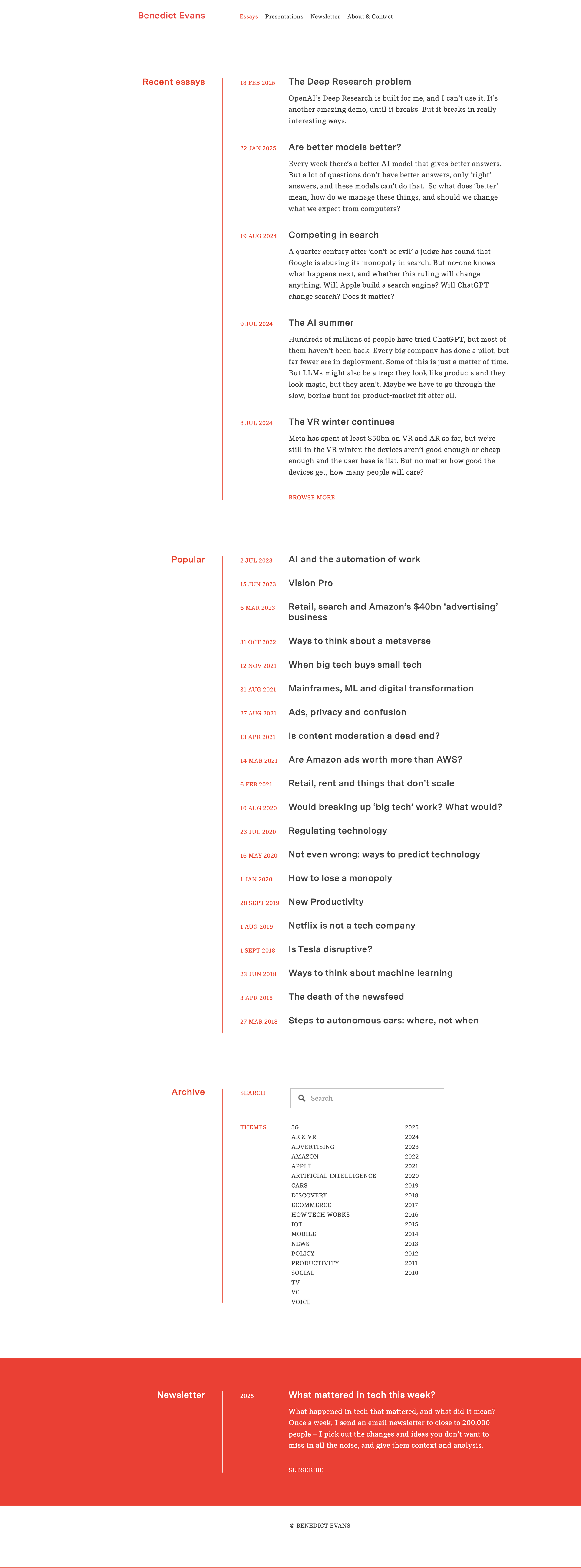
Si quieres ver un magnífico ejemplo de diseño minimalista para un blog, echa un vistazo al blog de Squarespace del analista tecnológico Benedict Evans. La maquetación es extremadamente limpia: mucho espacio en blanco, una tipografía sencilla y casi ningún elemento superfluo. La página de inicio presenta una lista de títulos de artículos y breves extractos en una sola columna, con un menú de cabecera básico y sin elementos que distraigan. Esta sencillez hace que toda la atención se centre en el contenido.
Por qué este diseño funciona bien:
Maximiza la legibilidad: el texto de alto contraste sobre fondo blanco y un tamaño de letra legible hacen que los artículos largos resulten agradables a la vista.
Navegación sencilla: solo unos pocos enlaces («Ensayos», «Boletín», etc.), para que los visitantes no se sientan abrumados.
Tiempo de carga rápido: no hay imágenes ni widgets innecesarios que ralenticen la página.
Diseño de blog en Squarespace con muchas imágenes – Meiwen See

A diferencia de las páginas web minimalistas, algunos blogs cautivan a los visitantes mediante diseños con gran cantidad de imágenes. El blog de Meiwen See en Squarespace es un ejemplo impresionante de diseño centrado en la fotografía. La página de inicio presenta una disposición de entradas en forma de cuadrícula, con imágenes en miniatura llamativas y texto minimalista. Dentro de cada entrada, las fotos de gran tamaño van acompañadas de párrafos breves, lo que hace que el contenido sea fácil de leer de un vistazo y visualmente atractivo.
Por qué este diseño funciona bien:
Una narrativa visual impactante: las fotografías llamativas captan la atención de inmediato.
Proporción equilibrada entre texto e imágenes: los párrafos cortos garantizan la legibilidad sin restar protagonismo a los elementos visuales.
Un diseño limpio y coherente: un fondo sencillo y una navegación intuitiva mejoran la experiencia del usuario.
Diseño de blog de Squarespace al estilo de una revista – Deem Journal

En el caso de los sitios web con gran cantidad de contenido, un diseño al estilo de una revista puede resultar muy eficaz. Deem Journal, una revista de diseño en línea creada con Squarespace, es un buen ejemplo de este estilo, con una presentación llamativa y bien organizada. Al acceder a la sección del blog, los visitantes se encuentran con un artículo destacado que ocupa un lugar prominente, con una imagen grande y un título. Debajo, el resto de las entradas aparecen en una cuadrícula de tres columnas.
Por qué este diseño funciona bien:
Aumenta la participación: la cuadrícula permite a los usuarios echar un vistazo rápido a varios artículos.
Crea un estilo editorial: las imágenes grandes y la tipografía llamativa lo hacen visualmente atractivo.
Adaptable a todos los dispositivos: la cuadrícula se ajusta perfectamente a las pantallas de los móviles, sin perder facilidad de uso.
Diseño sencillo para un blog en Squarespace – AAKS (Noticias de la marca)

Algunos de los diseños de blog más inspiradores adoptan un enfoque creativo y centrado en la marca. El blog «News» de AAKS es un ejemplo perfecto de un diseño creativo de blog en Squarespace que se ajusta a la identidad de marca. La maquetación consiste en una colorida cuadrícula de vistas previas de las entradas, con una sencilla barra de menú en la parte superior para filtrar por categorías.
Por qué este diseño funciona bien:
Refleja la identidad de la marca: los colores vivos y las imágenes están en consonancia con la estética de AAKS.
Sencillo pero funcional: estructura clara con filtros fáciles de usar.
Narrativa envolvente: las imágenes del «detrás de las cámaras» mantienen el interés de los lectores.
Ejemplos de diseños de blogs de Squespace creados por terceros
«Kintsugi», de Studio Mesa

Algunos de los diseños de blog más estructurados se centran en la claridad y la accesibilidad. La plantilla «Kintsugi» de Squarespace está diseñada para empresas orientadas a los servicios y presenta una estética limpia y relajante con un diseño de blog estructurado basado en una cuadrícula. Cada entrada del blog se muestra en vistas previas uniformes tipo tarjeta, haciendo un excelente uso del espacio en blanco y la tipografía para mejorar la legibilidad. La inclusión de etiquetas de categoría encima de cada entrada permite una navegación intuitiva, lo que ayuda a los visitantes a explorar el contenido en función de los temas que les interesan.
Por qué este diseño funciona bien:
Transmite claridad y profesionalidad: una maquetación estructurada en cuadrícula mantiene el contenido organizado visualmente y fácil de asimilar.
Mejora la navegación: las etiquetas de categoría ofrecen una experiencia de navegación optimizada, lo que permite a los lectores filtrar el contenido sin esfuerzo.
Equilibra la estética y la usabilidad: el uso cuidadoso del espacio en blanco y la tipografía crea una experiencia de lectura atractiva sin abrumar al lector.
«Launch Day», de Applet Studio

Algunos diseños de blogs apuestan por elementos visuales llamativos y de alto contraste para captar la atención de inmediato. La plantilla «Launch Day» de Squarespace presenta un diseño de blog dinámico y moderno, con títulos grandes y coloridos que llaman la atención. Las entradas del blog se organizan en una cuadrícula estructurada con miniaturas de imágenes redondeadas, lo que le da un aspecto elegante y atractivo. La sección superior clasifica el contenido en secciones claras y en las que se puede hacer clic, lo que garantiza que los visitantes puedan navegar rápidamente hasta los temas que les interesan.
Por qué este diseño funciona bien:
Un atractivo visual de gran impacto: la tipografía llamativa y el contraste de colores crean una primera impresión cautivadora.
Segmentación clara de los contenidos: la disposición estructurada facilita la navegación por las diferentes categorías de un solo vistazo.
Estética moderna y divertida: las miniaturas redondeadas y los elementos de diseño contemporáneo aportan un toque creativo que resulta muy atractivo para las empresas de servicios y los profesionales creativos.
«Unearth», de Big Cat Creative

Algunos de los diseños de blog más artísticos combinan la narración editorial con un diseño visualmente atractivo. La plantilla «Unearth» de Squarespace presenta una estética artística al estilo de una revista que equilibra las imágenes con la tipografía. Es perfecta para diseñadores, artistas y profesionales del branding que deseen mostrar su contenido de una forma creativa pero estructurada. La paleta de colores suaves y la tipografía refinada realzan el atractivo visual, mientras que las categorías de contenido se integran sutilmente para guiar al lector de forma fluida a través de los diferentes temas.
Por qué este diseño funciona bien:
Equilibrio entre imágenes y texto: los elementos visuales, bien situados, complementan el contenido sin restarle protagonismo.
Navegación elegante: la discreta organización por categorías facilita a los visitantes la exploración de diferentes temas, al tiempo que mantiene una estética refinada.
Consejos para diseñar un diseño atractivo para un blog en Squarespace
1. Prioriza la legibilidad con un diseño sencillo y claro
Utiliza una fuente legible y deja suficiente espacio en blanco.
Utiliza combinaciones de colores sencillas para lograr un mejor contraste del texto.
Asegúrate de que el texto tenga el espaciado adecuado para facilitar la lectura.
2. Utiliza imágenes de alta calidad para mejorar el contenido
Elige imágenes destacadas llamativas para cada entrada.
Optimiza las imágenes para evitar que tarden mucho en cargarse.
Utiliza una relación de aspecto uniforme para las miniaturas a fin de mantener la armonía visual.
3. Mantén el diseño despejado
Evita el uso excesivo de widgets, ventanas emergentes y elementos que distraigan la atención.
Mantén un estilo de diseño coherente en todas las páginas.
Sigue una jerarquía lógica de contenidos.
4. Garantizar una navegación clara e intuitiva
Coloca el menú principal en la parte superior para facilitar el acceso.
Utiliza los filtros de categorías o la barra de búsqueda para ayudar a los usuarios a encontrar contenido.
Plantéate utilizar un encabezado fijo para facilitar la navegación.
5. Incorporar la imagen de marca y la personalidad
Adapta los colores, las fuentes y las imágenes a tu marca.
Crea una identidad única para tu blog que destaque.
Utiliza plantillas personalizadas para las entradas del blog a fin de mantener la coherencia.
Aspectos de SEO a tener en cuenta en el diseño de un blog
La adaptabilidad a dispositivos móviles es fundamental. Probar el diseño en diferentes dispositivos garantiza que el texto y las imágenes se ajusten correctamente y que la navegación siga siendo intuitiva. Un menú adaptado a dispositivos móviles ayuda a los usuarios a acceder al contenido fácilmente, sin necesidad de ampliar ni desplazarse innecesariamente.
Optimizar la estructura del sitio web mejora su visibilidad. Una organización lógica de las categorías y las etiquetas, junto con los enlaces internos, facilita que tanto los visitantes como los motores de búsqueda exploren tu contenido. Las rutas de navegación o las secciones de «Artículos relacionados» fomentan aún más la participación, ya que guían a los lectores hacia contenido adicional.
La velocidad del sitio web desempeña un papel fundamental en el posicionamiento. La compresión de imágenes reduce el tamaño de los archivos, lo que evita que se tarden en cargarse; por otra parte, prescindir de animaciones excesivas y habilitar la carga diferida garantiza una experiencia de navegación fluida. Las páginas que se cargan rápidamente no solo mejoran la experiencia del usuario, sino que también envían señales positivas a los motores de búsqueda.
Los metadatos SEO y el texto alternativo deben implementarse de forma estratégica. Los títulos y las metadescripciones optimizados para SEO mejoran la visibilidad, mientras que el texto alternativo descriptivo de las imágenes mejora la accesibilidad y aumenta las posibilidades de aparecer en las búsquedas de imágenes. El uso de URL claras y descriptivas (como
yourdomain.com/squarespace-blog-layouts) mejora aún más el posicionamiento en los motores de búsqueda y la experiencia del usuario.
Conclusión
El diseño de tu blog es la estructura que sustenta tu contenido. Como hemos visto en estos ejemplos reales de blogs de Squarespace, no existe un diseño único que sirva para todos: puedes optar por un feed minimalista de una sola columna, una galería con muchas imágenes, una cuadrícula de revista con un acabado impecable o un diseño creativo centrado en la marca. Lo importante es que tu diseño se adapte a tu contenido y a tu público.
Inspírate en los ejemplos anteriores: toma prestadas ideas como el uso del espacio en blanco para destacar elementos, imágenes llamativas para captar la atención de los lectores o la organización de las entradas en una cuadrícula para aportar variedad. A continuación, aplica las mejores prácticas y los consejos que se ofrecen, como mantener la legibilidad, utilizar encabezados, optimizar el sitio para dispositivos móviles y garantizar que la estructura de tu sitio sea intuitiva.
Con unas decisiones de diseño bien pensadas, puedes transformar tu blog de Squarespace en un espacio atractivo, optimizado para el SEO y visualmente impresionante que haga que los lectores vuelvan una y otra vez. ¡Que disfrutes escribiendo en tu blog!

Squarespace Blogging: A Comprehensive Guide
Written by: Travis Vance | Owner of Coyote Moon
Blogging remains a fundamental tool for personal branding, content marketing, and knowledge sharing. Squarespace, the best website builder for bloggers, offers an extensive blogging platform that caters to both beginners and seasoned bloggers alike. In this comprehensive guide, we'll dive into the benefits that Squarespace brings to bloggers. From its intuitive built-in SEO tools to customizable display options and advanced content creation capabilities, Squarespace empowers bloggers to create an engaging ecosystem for their readers.
1. Leveraging Squarespace's Built-in Tag, Category, and Search Filters
Bloggers understand that effective content organization is vital for a great user experience. Squarespace simplifies content organization with its robust tagging and categorization features. These tools empower bloggers to create a logical and easily navigable structure for their posts, making it a breeze for readers to find relevant content.

Blog post tags and categories:The tagging and categorization system in Squarespace allows bloggers to classify their posts into topics or themes. This categorization is displayed prominently on your blog, making it easy for visitors to explore related content.
Squarespace search block: Additionally, Squarespace's search filter feature further enhances user experience, allowing your readers to search for specific topics or keywords, significantly improving the accessibility and usability of your blog.
For example, imagine you run a cooking blog. With Squarespace's built-in tagging and categorization features, you can neatly organize your recipes into categories like "Appetizers," "Desserts," or "Healthy Eating." When a reader visits your blog, they can easily navigate to the section that interests them the most, enhancing their overall experience.
2. Built-in Squarespace's SEO Tools:

Optimizing your blog for search engines is crucial to attract organic traffic. Squarespace understands the pivotal role of SEO and offers an impressive suite of SEO tools that empower bloggers to optimize their posts with precision.
SEO customization options: one of the standout features of Squarespace is its user-friendly SEO customization options. Bloggers can effortlessly customize critical elements of each blog post, including:
Thumbnail images
Blog post excerpts
Blog post URLs
Títulos SEO
Descripciones SEO
Social sharing images
This level of control enables you to tailor your content to match the search intent of your target audience, ultimately improving your blog's search engine visibility.
Social sharing: Squarespace simplifies the process of integrating your blog with popular social media platforms like Facebook, Twitter, and Google Search Console. By doing so, you can widen your reach and engage your audience more effectively. Sharing your blog posts on these platforms becomes a seamless part of your content strategy, increasing the chances of your content going viral and attracting even more visitors to your blog.
3. Squarespace Posting Options:

A flexible posting schedule is essential for bloggers to maintain consistency and keep their audience engaged. Squarespace's versatile posting options give you full control over your publishing schedule.
Create a blog post draft: write your blog post content and save it as a draft for future use.
Blog post needs review: maybe you have a large content team that needs to sign off on your blog post before it goes live.
Schedule a blog post: set a specific date and time for your blog post to publish to the web. Squarespace makes it effortless to ensure your content is released precisely when you want it to be.
This flexibility is especially useful for bloggers with busy schedules or those who want to maintain a regular posting cadence. You can batch-create content when you have the time and schedule it to be published at optimal times, ensuring that your blog remains fresh and engaging for your readers.
4. Blog Page Display Options:

The visual presentation of your blog plays a large role in capturing your audience's attention. Squarespace understands this and offers a wide range of diverse display options, allowing you to craft a blog layout that aligns perfectly with your brand's identity and your readers' preferences. You can choose from various blog page layouts, including:
Basic grid layouts
Side-by-side blogs
Single-column designs
Masonry layouts
Alternating side-by-side blogs
Each layout offers unique visual appeal, making it easy to find one that resonates with your content and audience.
Fine-tuning the details is where Squarespace truly shines. You can adjust the number of columns, image placement, text alignment, excerpt visibility, and more to create a visually captivating blog layout. For instance, if you run a photography blog, you might prefer a masonry layout that showcases your images in a stunning grid format, allowing your readers to appreciate your work in all its glory.
5. Tailoring Blog Post Display Options:

Each individual blog post is an opportunity to engage your readers and leave a lasting impression. Squarespace allows you to tailor each post to perfection by offering various display options to match your brand's style and the preferences of your audience.
Customize the content width
Set the text alignment
Adjust the meta content positioning (above or below the title)
Show/hide categories, publish dates, author names, and author profiles based on your blog's unique needs.
These customization options are invaluable for bloggers who want to create a cohesive and immersive reading experience. Whether your blog focuses on tech tutorials, travel stories, or fashion tips, Squarespace's flexibility ensures your content is presented exactly how you envision it.
6. Building Captivating Blog Posts:
Creating compelling blog posts is at the heart of successful blogging. Squarespace offers an extensive range of content blocks that help you craft captivating and informative posts. Here is a list of useful content blocks for your blog posts:
Text block
Image block
Button block: calls-to-action
Gallery block: display a gallery of images related to your blog post
Video block
Form block: collect feedback or comments on your blog post
Newsletter block: allow your readers to sign up for your newsletter
Social links block: allow your readers to connect with you on social media
Product block: pull in products from your online store to sell through your blog post
Squarespace provides the tools you need to bring your ideas to life. Imagine you're a travel blogger sharing your adventures around the world. With Squarespace's content blocks, you can seamlessly integrate stunning photo galleries and even embed videos to provide your readers with an immersive travel experience. Adding interactive forms allows your audience to engage with you directly, perhaps by asking questions or sharing their own travel stories.
7. Enhancing the Reader's Experience:

Creating an exceptional reader experience is key to building a loyal audience. Squarespace offers many interactive features to engage with your audience. But there are customizations you can add to take your blog to the next level:
Reading Time Calculation: Squarespace allows you to insert code that calculates estimated reading time based on word or character count. This feature gives your readers an idea of how long it will take to consume your content, helping them plan their reading accordingly.
Social Share Buttons: You can easily incorporate social media share buttons using embed codes from platforms like ElfSight. This enables your readers to share your content with their networks, increasing your blog's reach and potentially attracting new visitors.
Table of Contents: Squarespace supports the inclusion of a table of contents using code snippets from services like Adlytic Marketing. A table of contents makes it easier for readers to navigate longer posts, quickly finding the sections that interest them the most.
Related Articles: Keeping your readers engaged is essential. Squarespace offers built-in summary blocks that allow you to display related articles at
8. Creating a Standardized Blog Template:

Consistency is key to building a strong brand and a loyal readership. Squarespace makes it easy to create a standardized blog template that you can use for every new post. This template ensures that your blog maintains a cohesive look and feel, making it instantly recognizable to your audience. In your standardized template, you can include elements such as:
"Related Posts" summary blocks: to encourage further exploration of your content.
Newsletter block: allows your readers to subscribe to your updates, ensuring you can reach them with new content and updates.
Button blocks: consistent call-to-action sections at the end of each post can guide your readers to take desired actions, such as signing up for your services or purchasing your products.
Conclusion:
Squarespace offers a comprehensive and user-friendly platform for bloggers to build, customize, and optimize their blogs. With its built-in SEO tools, flexible display options, and a wide range of content blocks, Squarespace empowers bloggers to create engaging and visually appealing content that resonates with their audience.
By utilizing the full suite of Squarespace's blogging features, you can improve your online presence, drive more traffic to your website, and ultimately boost your chances of ranking on page one in Google search results.
So, whether you're a seasoned blogger looking to revamp your website or a newbie, Squarespace is your ideal partner for publishing your content online. Your path to successful blogging begins here, with Squarespace.

Travis Vance is the owner and lead designer at Coyote Moon, a Squarespace web design studio. After working as a Squarespace employee for 7 years, he’s taking his in-depth knowledge on the inner workings of the Squarespace platform to help business owners of all sizes reach their full potential online.

Your Blog Isn't Dead — It's Just Sleeping
Are you hoping for more interaction with your Squarespace content? Don’t give up too soon - here are some things you can do:
How to Re-Engage Your Audience and Turn Your Blog into a Client Magnet
You started your blog with big plans. Maybe you had a content calendar, a few high-effort posts, and the hope that consistent publishing would attract your dream clients. You hit publish, waited for the traffic to roll in… and then? Crickets.
The silence is disappointing, but it’s not a death sentence. If your blog has gone quiet, that doesn’t mean it failed — it probably just lost momentum. And here’s the good news: momentum can be rebuilt.
Content marketing still works. It’s one of the most sustainable ways to attract aligned clients, build trust, and showcase your expertise as a Squarespace web designer. The key is knowing how to bring your blog back to life in a way that feels worth the effort — and gets results.
Need quick tips for content promotion? Download ours here
What’s Really Going On With Your Blog?
Before you try to fix anything, it’s worth asking the question: is your blog struggling because of what you’re writing, or because no one is seeing it?
A lot of web designers fall into the same trap. You’re great at what you do, but writing consistent, high-quality content that connects with your ideal client? That’s a skill of its own — and it takes time.
Sometimes the issue is that the content doesn’t speak directly to the pain points of your audience. Other times, it’s not a content problem at all — it’s a visibility problem. Even the most brilliant insights won’t convert if no one’s reading them. And if you’re not actively driving traffic, optimizing for search, or distributing your posts to the right people, your blog’s reach stays small.
It’s also possible that you simply haven’t given your content enough time. SEO doesn’t reward short sprints. It’s a long game. Rankings and engagement can take weeks or even months to build — especially on Squarespace, where the SEO tools are good but not always plug-and-play.
The takeaway here is simple: don’t assume your blog isn’t working just because it’s quiet. It might need clearer positioning, more focused topics, or better promotion — but it’s not beyond saving.
Why Your Blog Still Matters (Especially As a Designer)
When people talk about content marketing, they often focus on traffic and conversions. But as a designer, your blog is more than a lead magnet — it’s a visible extension of your creative point of view.
Think about what you want prospective clients to feel when they land on your site. Do you want them to see you as a technician or a strategist? Someone who executes, or someone who leads? A blog full of thoughtful, useful, well-written content helps them understand what it’s like to work with you — before they even reach out.
It’s also one of the easiest ways to demonstrate your process. A case study, a client story, a reflection on why you designed something a certain way — these kinds of posts are what separate a generic portfolio from a memorable brand.
And the SEO bonus? Each post is an opportunity to rank for a new keyword, build topical authority, and drive people to the parts of your site that convert.
Getting Back Into the Flow
If it’s been a while since you posted, start by giving yourself permission to ease back in.
You don’t need to start publishing every week or overhaul your entire strategy overnight. Begin by revisiting your old posts. Which ones still feel relevant? Which ones could be expanded or updated? This is often the lowest-effort, highest-return place to begin.
From there, pick one topic you care about — ideally something your ideal client is already Googling. That might be how to choose a Squarespace template for a coaching business, how to fix layout issues on mobile, or what to do when your site looks great but isn’t converting.
The goal isn’t to chase trends or flood the internet. The goal is to create one piece of thoughtful, well-positioned content that speaks to a specific need — and then share it in the places where your audience already is.
Facebook groups. Reddit threads. Your email list. A short Instagram Reel or a carousel post that repackages a paragraph from the blog. These tiny bridges can revive your traffic without overwhelming you.
What Happens When You Stay Consistent
You don’t need your blog to “go viral.” You need it to do its job.
That job might be to attract 1–2 qualified leads a month. Or to warm up cold referrals who are vetting you. Or to give people a reason to stay on your site for more than 10 seconds.
When you treat your blog like a tool — not a vanity metric — everything shifts.
It stops being about trying to “win” at content, and starts being about showing up clearly, generously, and consistently in front of the people who are already looking for someone like you.
And if you’re not ready to write regularly? No shame in that. You can always repurpose existing content, outsource a few posts to a writer, or go deep on just one post each quarter.
Consistency doesn’t mean frequency. It means reliability. That’s what builds trust.
Get our quick content promotion ideas here
Final Thought
A quiet blog isn’t a wasted blog. It’s a sleeping asset — and with the right approach, you can wake it up.
Start small. Rework one post. Promote it intentionally. See what lands. Then keep going.
You don’t need a content empire. You just need a few great pieces, aligned with what you do best, working quietly in the background to bring the right people your way.
And if you want help figuring out what to write or how to revive what you’ve already got, I’m happy to help. This is the stuff I love.